# 9. E-PTW

<u><span lang="EN-US" style="mso-bidi-font-family: Calibri; mso-bidi-theme-font: minor-latin; mso-ansi-language: EN-US;">Settings -&gt; e-PTW:</span></u>

User can configure e-PTW configuration, New e-PTW Form Custom Fields, Contractor Form Custom Fields, Health Declaration. Options are available as menu on left side, e-PTW is highlighted by default.

[![settings-eptw1.png](https://kb.asseto.ai/uploads/images/gallery/2024-09/embedded-image-4jo1szci.png)](http://ec2-3-7-68-25.ap-south-1.compute.amazonaws.com/uploads/images/gallery/2024-08/settings-eptw1.png)
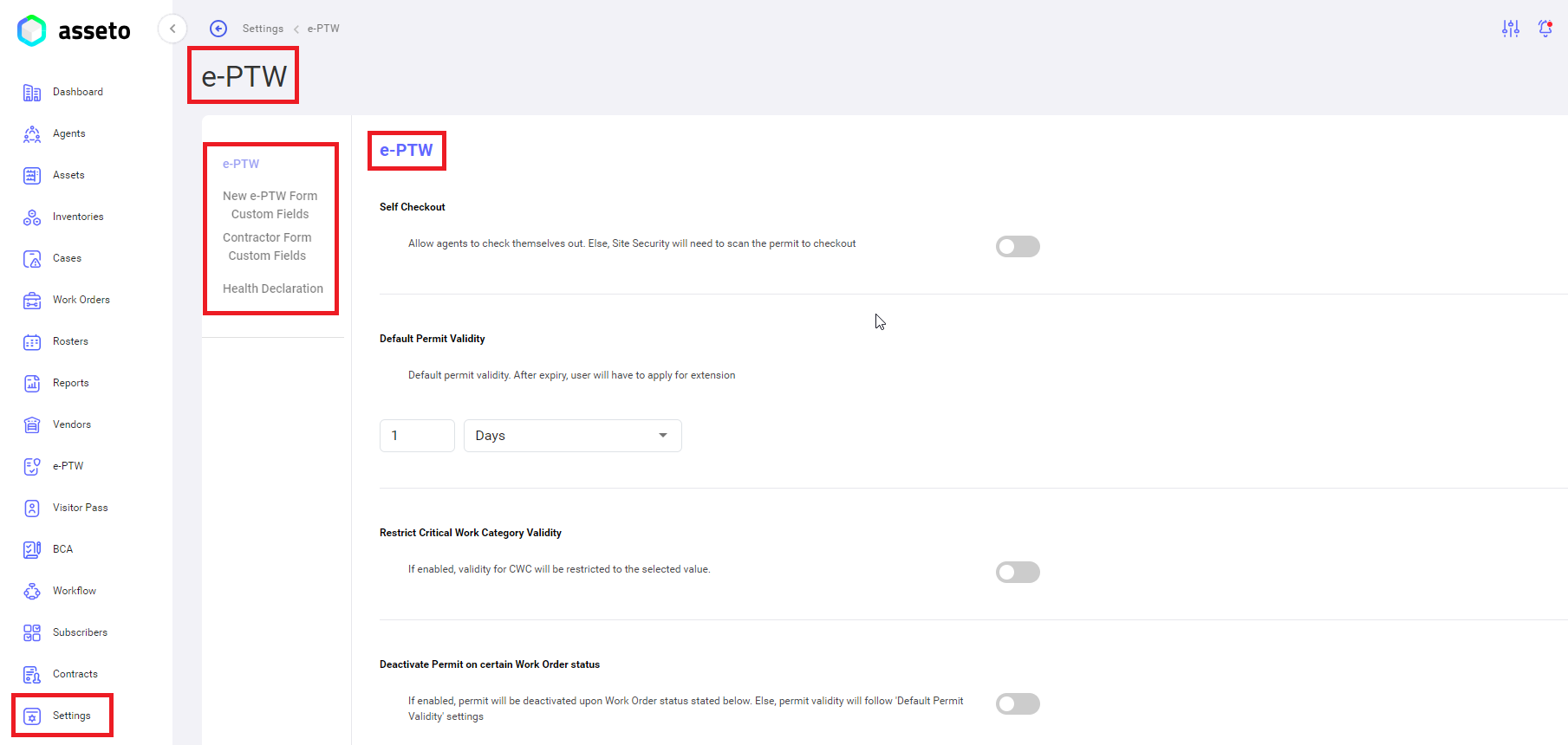
 **<span style="mso-bidi-font-family: Calibri; mso-bidi-theme-font: minor-latin;"><span style="mso-list: Ignore;">i.<span style="font: 7.0pt 'Times New Roman';"> </span></span></span>****Settings -&gt; e-PTW -&gt; e-PTW**

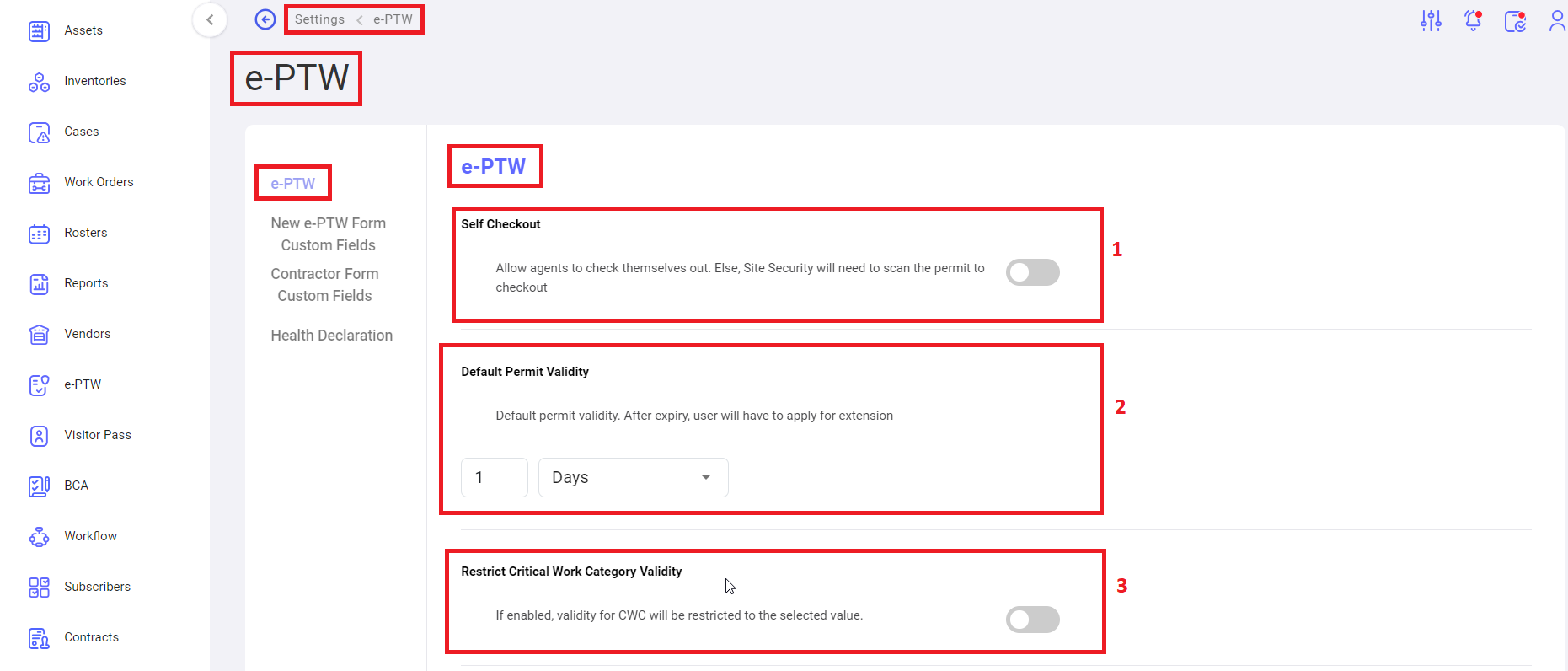
[![settings- e-ptw1.png](https://kb.asseto.ai/uploads/images/gallery/2024-09/embedded-image-446wksdt.png)](http://ec2-3-7-68-25.ap-south-1.compute.amazonaws.com/uploads/images/gallery/2024-08/settings-e-ptw1.png)

 <span style="mso-bidi-font-family: Calibri; mso-bidi-theme-font: minor-latin;"><span style="mso-list: Ignore;">1.<span style="font: 7.0pt 'Times New Roman';"> </span></span></span>Self Checkout: user can enable/disable this status, whether to allow agents to check themselves out. Else, site security will need to scan the permit to checkout.

<span style="mso-bidi-font-family: Calibri; mso-bidi-theme-font: minor-latin;"><span style="mso-list: Ignore;">2.<span style="font: 7.0pt 'Times New Roman';"> </span></span></span><u>Default Permit Validity</u>: user should provide duration for default permit validity. After expiry, user will have to apply for extension.

<span style="mso-bidi-font-family: Calibri; mso-bidi-theme-font: minor-latin;"><span style="mso-list: Ignore;">3.<span style="font: 7.0pt 'Times New Roman';"> </span></span></span><u>Restrict critical work category validity</u>: when the status is enabled, validity for CWC will be restricted to the selected value.

[![settings- e-ptw2.png](https://kb.asseto.ai/uploads/images/gallery/2024-09/embedded-image-oy39comf.png)](http://ec2-3-7-68-25.ap-south-1.compute.amazonaws.com/uploads/images/gallery/2024-08/settings-e-ptw2.png)
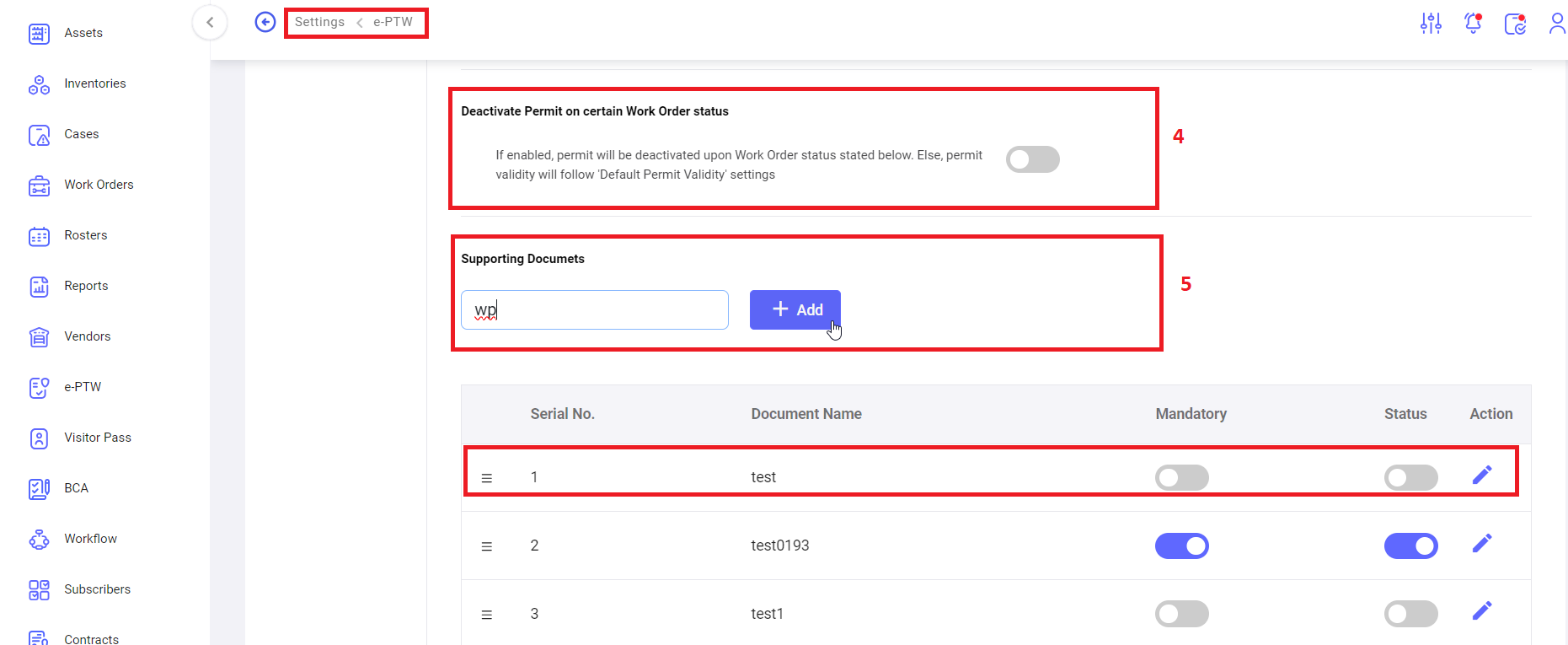
 <span style="mso-bidi-font-family: Calibri; mso-bidi-theme-font: minor-latin;"><span style="mso-list: Ignore;">4.<span style="font: 7.0pt 'Times New Roman';"> </span></span></span><u>Deactivate permit on certain work order status</u>: when the status is enabled, permit will be deactivated upon work order status stated below. Else, permit validity will follow ‘default permit validity’ settings.

<span style="mso-bidi-font-family: Calibri; mso-bidi-theme-font: minor-latin;"><span style="mso-list: Ignore;">5.<span style="font: 7.0pt 'Times New Roman';"> </span></span></span><u>Supporting Documents</u>: to add the supporting documents for the work permit. Added documents displaying below table, here user can enable/disable the status of the document and edit the document.

[![settings- e-ptw3.png](https://kb.asseto.ai/uploads/images/gallery/2024-09/embedded-image-bki0jck9.png)](http://ec2-3-7-68-25.ap-south-1.compute.amazonaws.com/uploads/images/gallery/2024-08/settings-e-ptw3.png)
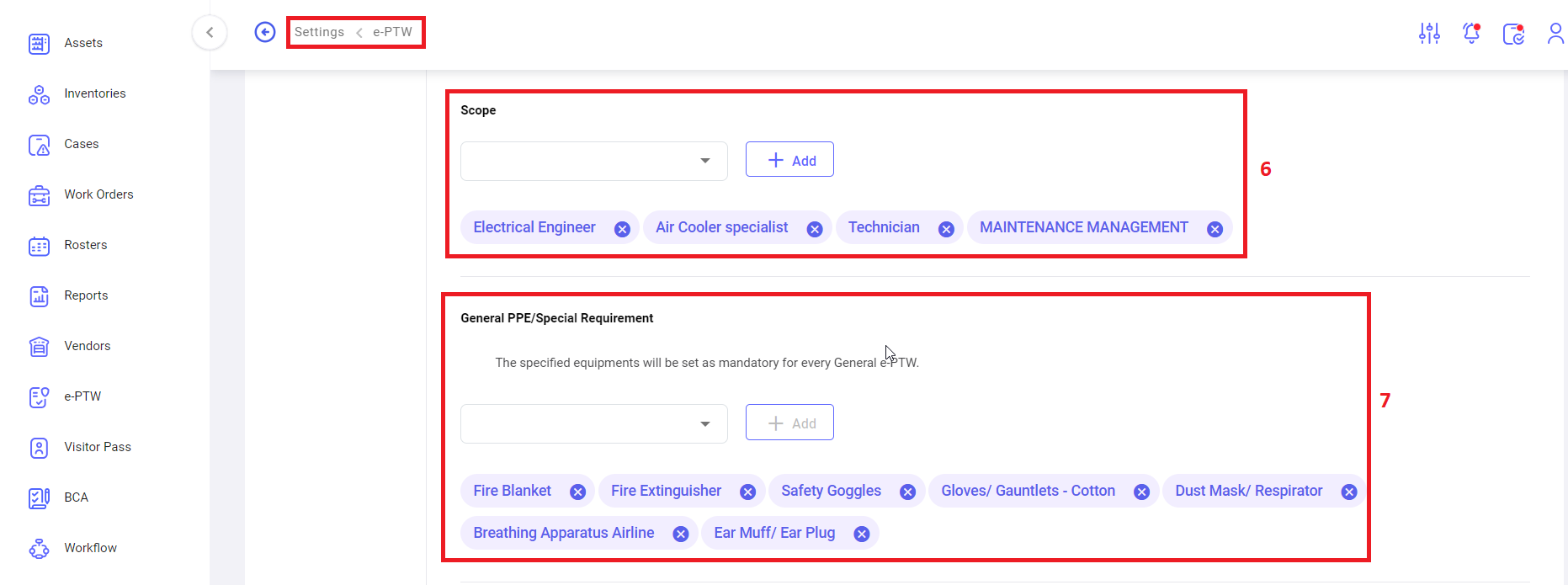
 <span class="eop"><span style="font-size: 11.0pt; line-height: 115%; font-family: 'Calibri',sans-serif; mso-ascii-theme-font: minor-latin; mso-fareast-font-family: Calibri; mso-fareast-theme-font: minor-latin; mso-hansi-theme-font: minor-latin; mso-bidi-theme-font: minor-latin; color: #444444; mso-color-alt: windowtext;"><span style="mso-list: Ignore;">6.<span style="font: 7.0pt 'Times New Roman';"> </span></span></span></span><u><span style="font-size: 11.0pt; line-height: 115%; font-family: 'Calibri',sans-serif; mso-ascii-theme-font: minor-latin; mso-hansi-theme-font: minor-latin; mso-bidi-theme-font: minor-latin; color: black; mso-color-alt: windowtext;">Scope</span></u><span style="font-size: 11.0pt; line-height: 115%; font-family: 'Calibri',sans-serif; mso-ascii-theme-font: minor-latin; mso-hansi-theme-font: minor-latin; mso-bidi-theme-font: minor-latin; color: black; mso-color-alt: windowtext;">: </span><span class="normaltextrun"><span lang="EN-US" style="font-size: 11.0pt; line-height: 115%; font-family: 'Calibri',sans-serif; mso-ascii-theme-font: minor-latin; mso-hansi-theme-font: minor-latin; mso-bidi-theme-font: minor-latin; color: #444444; border: none windowtext 1.0pt; mso-border-alt: none windowtext 0cm; padding: 0cm; mso-ansi-language: EN-US;">Scopes will be listed in the drop-down menu. </span><span style="box-sizing: border-box; outline-color: var(--color-primary); outline-width: 1px;">Users can select the scope &amp; click on Add option. Scopes added by users are shown below the Scope field and user can remove the specific scope (by clicking on close icon).</span></span><span class="eop"><span style="font-size: 11.0pt; line-height: 115%; font-family: 'Calibri',sans-serif; mso-ascii-theme-font: minor-latin; mso-fareast-font-family: 'Times New Roman'; mso-fareast-theme-font: major-fareast; mso-hansi-theme-font: minor-latin; mso-bidi-theme-font: minor-latin; color: #444444; border: none windowtext 1.0pt; mso-border-alt: none windowtext 0cm; padding: 0cm;"><span data-ccp-props="{"201341983":0,"335559739":160,"335559740":279}" style="box-sizing: border-box; outline-color: var(--color-primary); outline-width: 1px;"> </span></span></span>

<span style="font-size: 11.0pt; line-height: 115%; font-family: 'Calibri',sans-serif; mso-ascii-theme-font: minor-latin; mso-fareast-font-family: Calibri; mso-fareast-theme-font: minor-latin; mso-hansi-theme-font: minor-latin; mso-bidi-theme-font: minor-latin; color: #444444; mso-color-alt: windowtext;"><span style="mso-list: Ignore;">7.<span style="font: 7.0pt 'Times New Roman';"> </span></span></span><u><span style="font-size: 11.0pt; line-height: 115%; font-family: 'Calibri',sans-serif; mso-ascii-theme-font: minor-latin; mso-hansi-theme-font: minor-latin; mso-bidi-theme-font: minor-latin; color: black; mso-color-alt: windowtext;">General PPE/Special Requirement</span></u><span style="font-size: 11.0pt; line-height: 115%; font-family: 'Calibri',sans-serif; mso-ascii-theme-font: minor-latin; mso-hansi-theme-font: minor-latin; mso-bidi-theme-font: minor-latin; color: black; mso-color-alt: windowtext;">: The specified equipment’s will be set as mandatory for every general e-PTW.</span>

<span style="font-family: Symbol; mso-fareast-font-family: Symbol; mso-bidi-font-family: Symbol;"><span style="mso-list: Ignore;">·<span style="font: 7.0pt 'Times New Roman';"> </span></span></span><span style="mso-bidi-font-family: Calibri; mso-bidi-theme-font: minor-latin;">Equipment’s </span><span class="normaltextrun"><span lang="EN-US" style="mso-bidi-font-family: Calibri; mso-bidi-theme-font: minor-latin; color: #444444; border: none windowtext 1.0pt; mso-border-alt: none windowtext 0cm; padding: 0cm; mso-ansi-language: EN-US;">will be listed in the drop-down menu. </span><span style="box-sizing: border-box; outline-color: var(--color-primary); outline-width: 1px;">Users can select the </span></span><span style="mso-bidi-font-family: Calibri; mso-bidi-theme-font: minor-latin;">equipment </span><span class="normaltextrun"><span lang="EN-US" style="mso-bidi-font-family: Calibri; mso-bidi-theme-font: minor-latin; color: #444444; border: none windowtext 1.0pt; mso-border-alt: none windowtext 0cm; padding: 0cm; mso-ansi-language: EN-US;">&amp; click on Add option. </span></span><span style="mso-bidi-font-family: Calibri; mso-bidi-theme-font: minor-latin;">Equipment </span><span class="normaltextrun"><span lang="EN-US" style="mso-bidi-font-family: Calibri; mso-bidi-theme-font: minor-latin; color: #444444; border: none windowtext 1.0pt; mso-border-alt: none windowtext 0cm; padding: 0cm; mso-ansi-language: EN-US;">added by users are shown below the </span></span><span style="mso-bidi-font-family: Calibri; mso-bidi-theme-font: minor-latin;">equipment’s </span><span class="normaltextrun"><span lang="EN-US" style="mso-bidi-font-family: Calibri; mso-bidi-theme-font: minor-latin; color: #444444; border: none windowtext 1.0pt; mso-border-alt: none windowtext 0cm; padding: 0cm; mso-ansi-language: EN-US;">field and user can remove the specific </span></span><span style="mso-bidi-font-family: Calibri; mso-bidi-theme-font: minor-latin;">equipment </span><span class="normaltextrun"><span lang="EN-US" style="mso-bidi-font-family: Calibri; mso-bidi-theme-font: minor-latin; color: #444444; border: none windowtext 1.0pt; mso-border-alt: none windowtext 0cm; padding: 0cm; mso-ansi-language: EN-US;">(by clicking on close icon).</span></span><span class="eop"><span style="mso-fareast-font-family: 'Times New Roman'; mso-fareast-theme-font: major-fareast; mso-bidi-font-family: Calibri; mso-bidi-theme-font: minor-latin; color: #444444; border: none windowtext 1.0pt; mso-border-alt: none windowtext 0cm; padding: 0cm;"><span data-ccp-props="{"201341983":0,"335559739":160,"335559740":279}" style="box-sizing: border-box; outline-color: var(--color-primary); outline-width: 1px;"> </span></span></span>

[![settings- e-ptw4.png](https://kb.asseto.ai/uploads/images/gallery/2024-09/embedded-image-yynhmvvl.png)](http://ec2-3-7-68-25.ap-south-1.compute.amazonaws.com/uploads/images/gallery/2024-08/settings-e-ptw4.png)

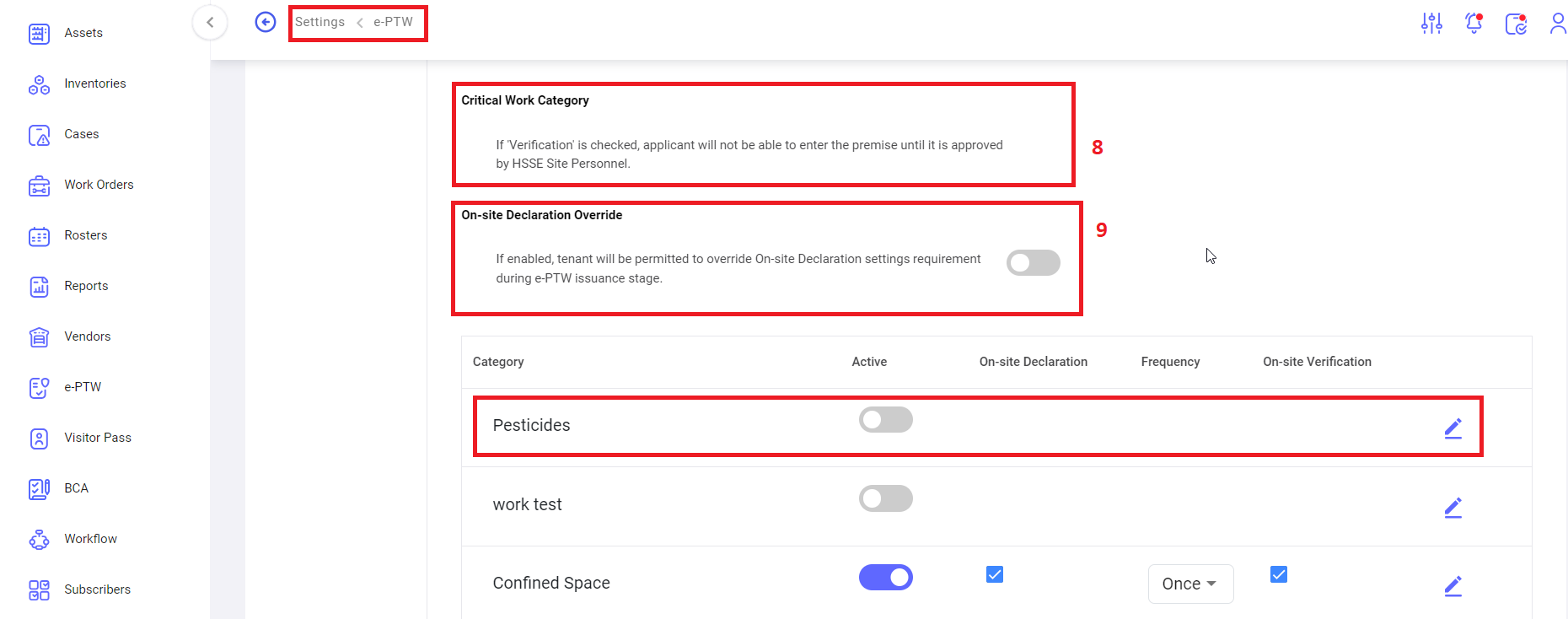
<span style="mso-bidi-font-family: Calibri; mso-bidi-theme-font: minor-latin;"><span style="mso-list: Ignore;"> 8.<span style="font: 7.0pt 'Times New Roman';"> </span></span></span><span style="mso-spacerun: yes;"> </span><u>Critical work category</u>: if ‘verification’ is checked, applicant will not be able to enter the <span style="mso-spacerun: yes;"> </span>premise until it is approved by HSSE site personnel.

<span style="mso-bidi-font-family: Calibri; mso-bidi-theme-font: minor-latin;"><span style="mso-list: Ignore;">9.<span style="font: 7.0pt 'Times New Roman';"> </span></span></span><u>On-site declaration override</u>: if enabled, tenant will be permitted to override on-site declaration settings requirement during e-PTW issuance stage.

[![settings- e-ptw5.png](https://kb.asseto.ai/uploads/images/gallery/2024-09/embedded-image-pttmju1r.png)](http://ec2-3-7-68-25.ap-south-1.compute.amazonaws.com/uploads/images/gallery/2024-08/settings-e-ptw5.png)

 Click on “add new” button to add the new critical work, following page will be open.

[![settings- e-ptw6.png](https://kb.asseto.ai/uploads/images/gallery/2024-09/embedded-image-0mbr66qd.png)](http://ec2-3-7-68-25.ap-south-1.compute.amazonaws.com/uploads/images/gallery/2024-08/settings-e-ptw6.png)
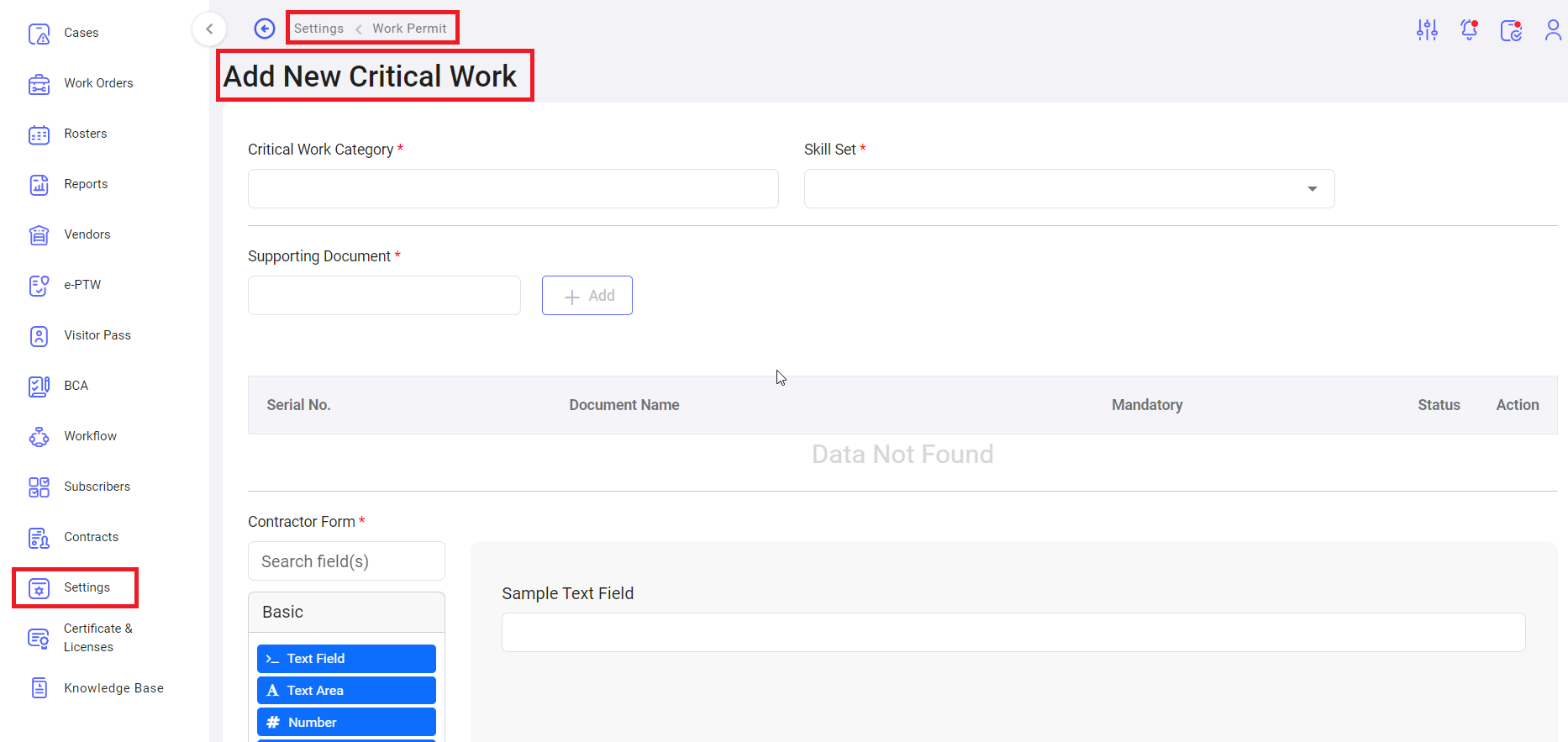
 Fill the all-mandatory fields and click on save. Saved critical work order will display in the table as shown by following screenshot.

[![settings- e-ptw7.png](https://kb.asseto.ai/uploads/images/gallery/2024-09/embedded-image-vmes7cxf.png)](http://ec2-3-7-68-25.ap-south-1.compute.amazonaws.com/uploads/images/gallery/2024-08/settings-e-ptw7.png)
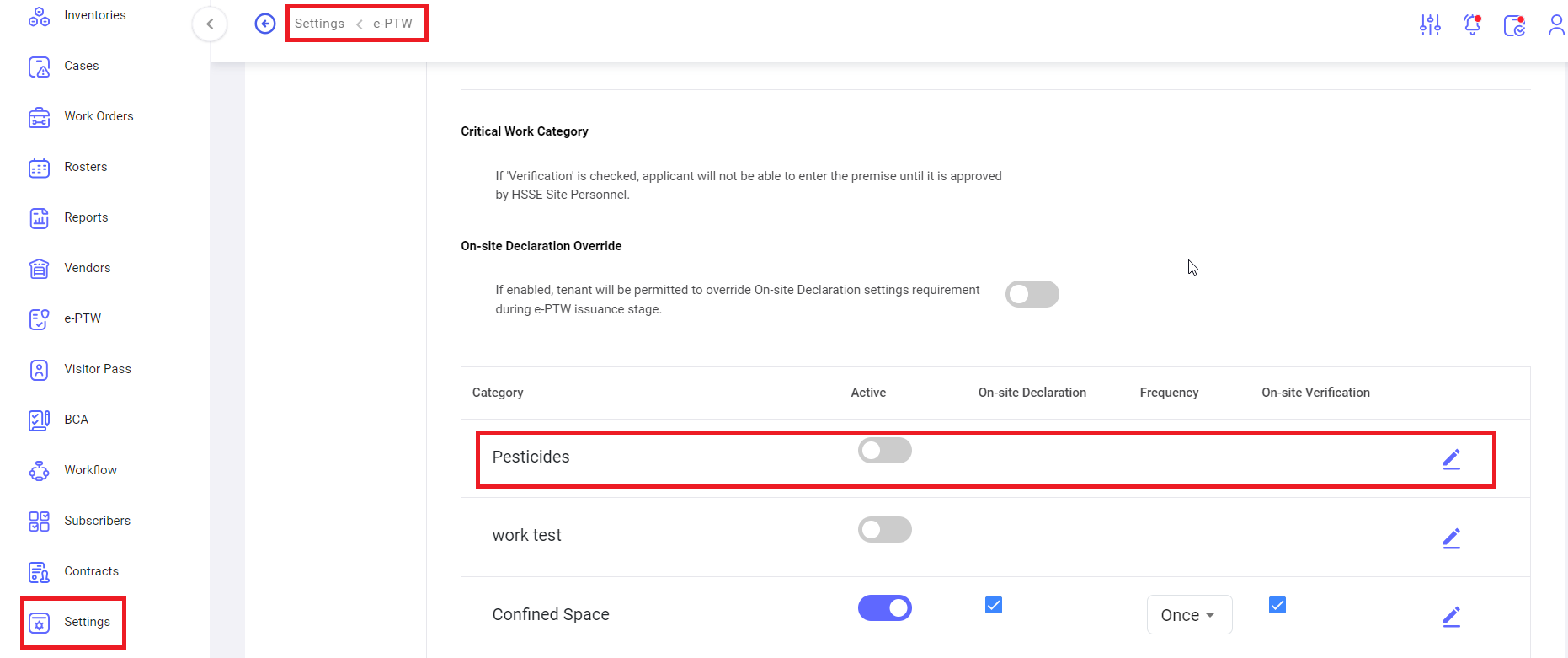
 <u>Status</u>: user can activate/deactivate the status of new critical work.

<u>Edit</u>: user can edit the new critical work details.

[![settings- e-ptw8.png](https://kb.asseto.ai/uploads/images/gallery/2024-09/embedded-image-mvjss21j.png)](http://ec2-3-7-68-25.ap-south-1.compute.amazonaws.com/uploads/images/gallery/2024-08/settings-e-ptw8.png)
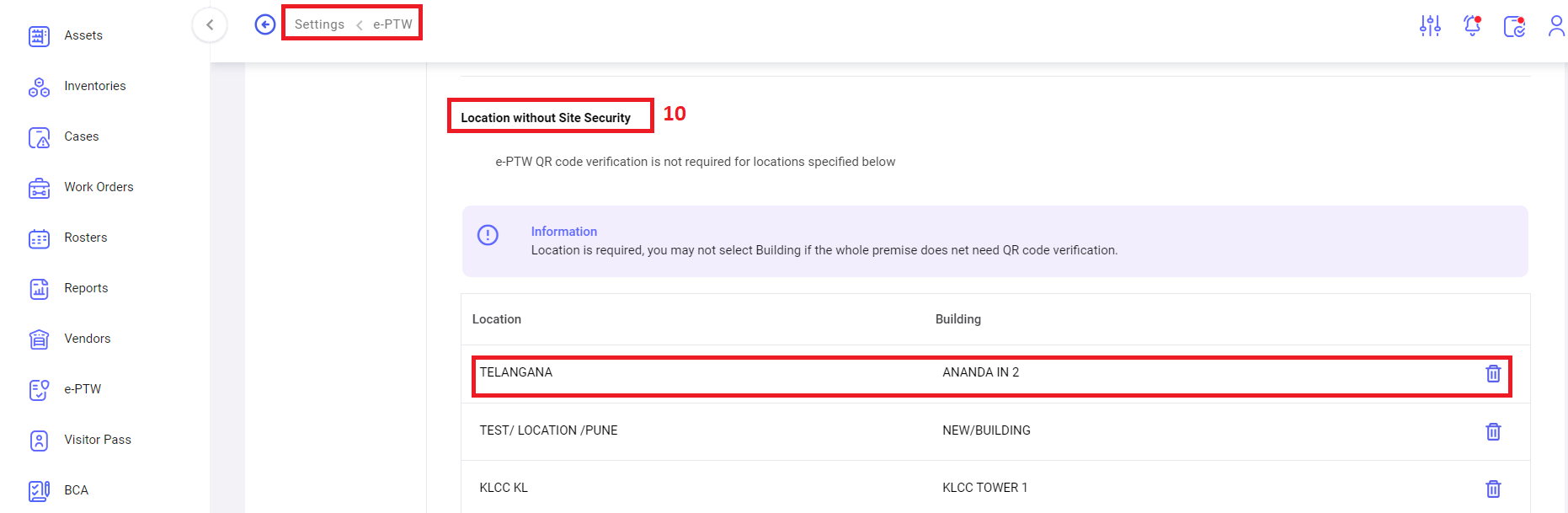
<span style="mso-bidi-font-family: Calibri; mso-bidi-theme-font: minor-latin;"><span style="mso-list: Ignore;">10.<span style="font: 7.0pt 'Times New Roman';"> </span></span></span><u>Location without site Security</u>: e-PTW QR code verification is not required for locations specified in the table shown by above screenshot.

[![settings- e-ptw9.png](https://kb.asseto.ai/uploads/images/gallery/2024-09/embedded-image-mrq8u7ld.png)](http://ec2-3-7-68-25.ap-south-1.compute.amazonaws.com/uploads/images/gallery/2024-08/settings-e-ptw9.png)
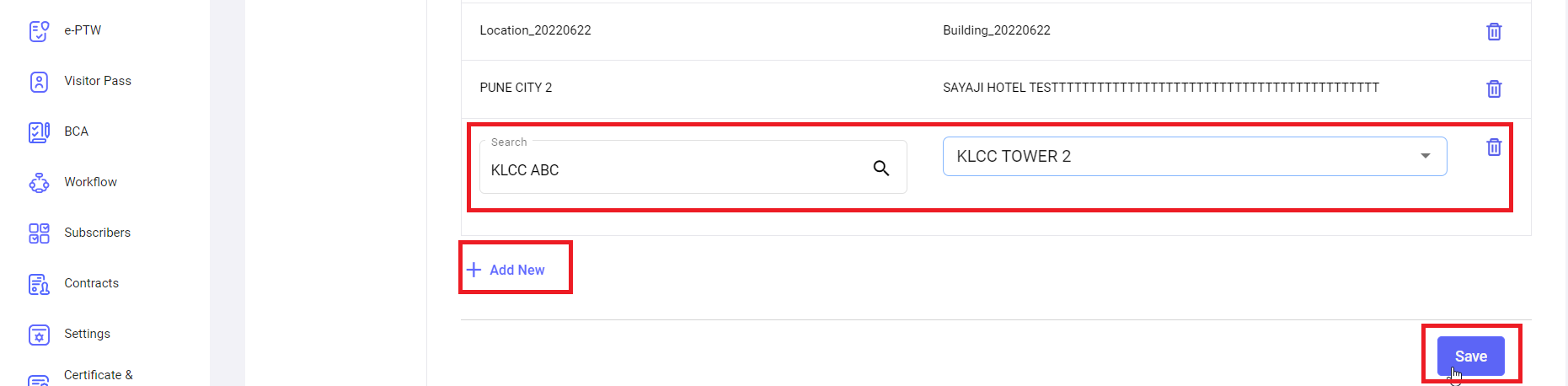
To add the location, click on “Add New” button, enter the details and click on “save” button.

**<span style="mso-bidi-font-family: Calibri; mso-bidi-theme-font: minor-latin;"><span style="mso-list: Ignore;">ii.<span style="font: 7.0pt 'Times New Roman';"> </span></span></span>****Settings -&gt; e-PTW -&gt; New e-PTW Form Custom Fields**

[![settings- e-ptw custom fields1.png](https://kb.asseto.ai/uploads/images/gallery/2024-09/embedded-image-n6nnd77o.png)](http://ec2-3-7-68-25.ap-south-1.compute.amazonaws.com/uploads/images/gallery/2024-08/settings-e-ptw-custom-fields1.png)

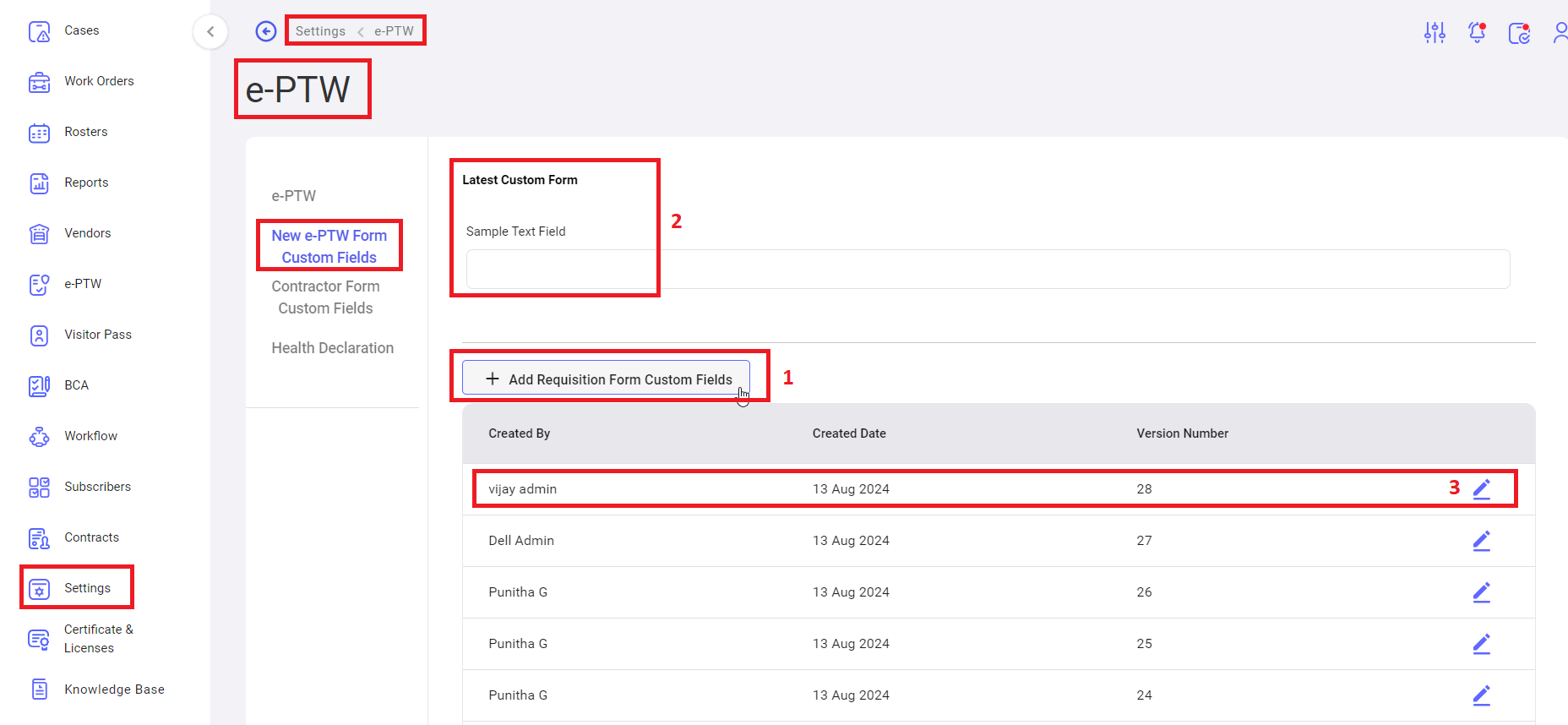
<span style="mso-bidi-font-family: Calibri; mso-bidi-theme-font: minor-latin;"><span style="mso-list: Ignore;">1.<span style="font: 7.0pt 'Times New Roman';"> </span></span></span><u>Add requisition form custom fields</u>: to add the requisition form custom fields click on this button, system navigate create new page. Add all the details and click on submit button.

<span style="mso-bidi-font-family: Calibri; mso-bidi-theme-font: minor-latin;"><span style="mso-list: Ignore;">2.<span style="font: 7.0pt 'Times New Roman';"> </span></span></span><u>Latest custom form</u>: user can view latest custom form.

<span style="mso-bidi-font-family: Calibri; mso-bidi-theme-font: minor-latin;"><span style="mso-list: Ignore;">3.<span style="font: 7.0pt 'Times New Roman';"> </span></span></span><u>Edit</u>: to edit the custom form.

**<span style="mso-bidi-font-family: Calibri; mso-bidi-theme-font: minor-latin;"><span style="mso-list: Ignore;">iii.<span style="font: 7.0pt 'Times New Roman';"> </span></span></span>****Settings -&gt; e-PTW -&gt; Contractor Form Custom Fields**

[![settings- e-ptw - contractor custom fields1.png](https://kb.asseto.ai/uploads/images/gallery/2024-09/embedded-image-vk6eoa16.png)](http://ec2-3-7-68-25.ap-south-1.compute.amazonaws.com/uploads/images/gallery/2024-08/settings-e-ptw-contractor-custom-fields1.png)

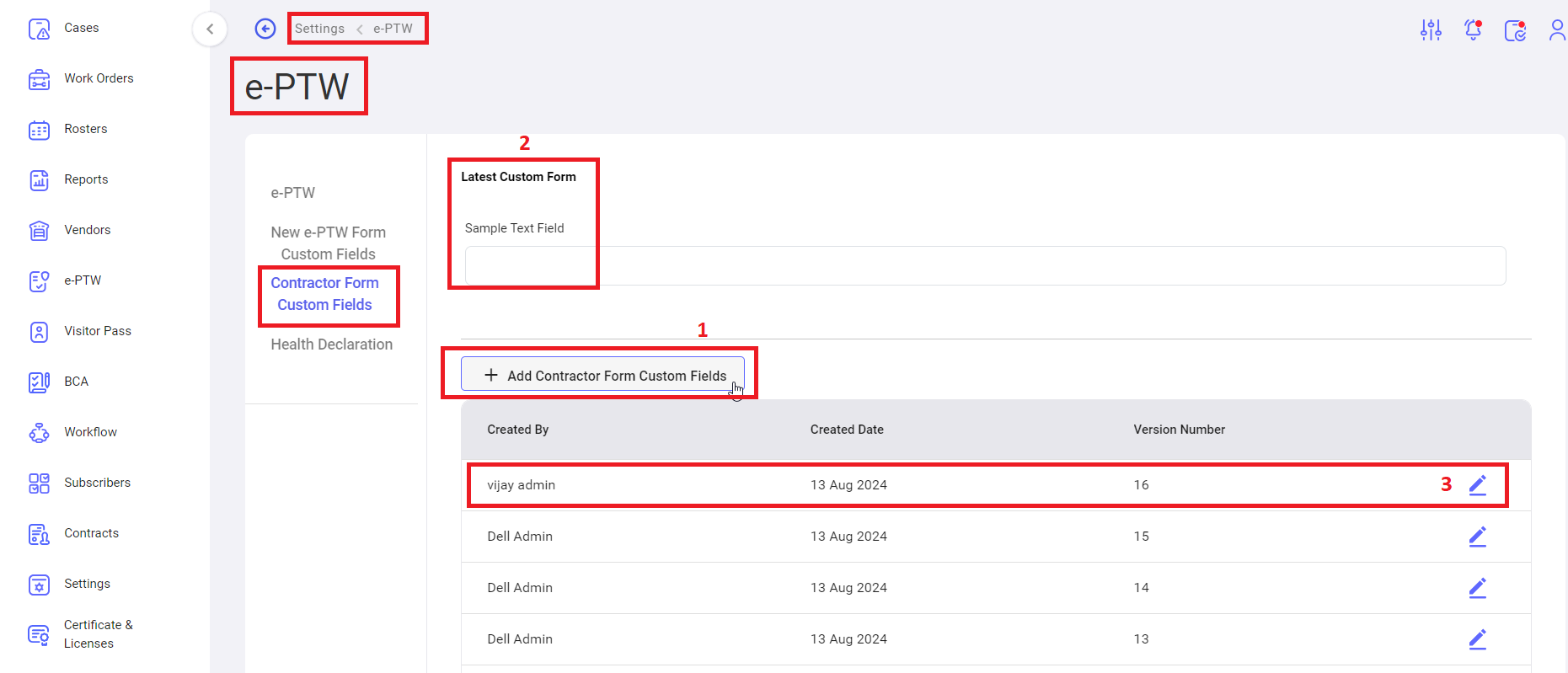
 <span style="mso-bidi-font-family: Calibri; mso-bidi-theme-font: minor-latin;"><span style="mso-list: Ignore;">1.<span style="font: 7.0pt 'Times New Roman';"> </span></span></span><u>Add Contractor form custom fields</u>: to add the Contractor<u> </u>form custom fields click on this button, system navigate create new page. Add all the details and click on submit button.

<span style="mso-bidi-font-family: Calibri; mso-bidi-theme-font: minor-latin;"><span style="mso-list: Ignore;">2.<span style="font: 7.0pt 'Times New Roman';"> </span></span></span><u>Latest custom form</u>: user can view latest custom form.

<span style="mso-bidi-font-family: Calibri; mso-bidi-theme-font: minor-latin;"><span style="mso-list: Ignore;">3.<span style="font: 7.0pt 'Times New Roman';"> </span></span></span><u>Edit</u>: to edit the custom form.

**<span style="mso-bidi-font-family: Calibri; mso-bidi-theme-font: minor-latin;"><span style="mso-list: Ignore;">iv.<span style="font: 7.0pt 'Times New Roman';"> </span></span></span>****Settings -&gt; e-PTW -&gt; Health Declaration**

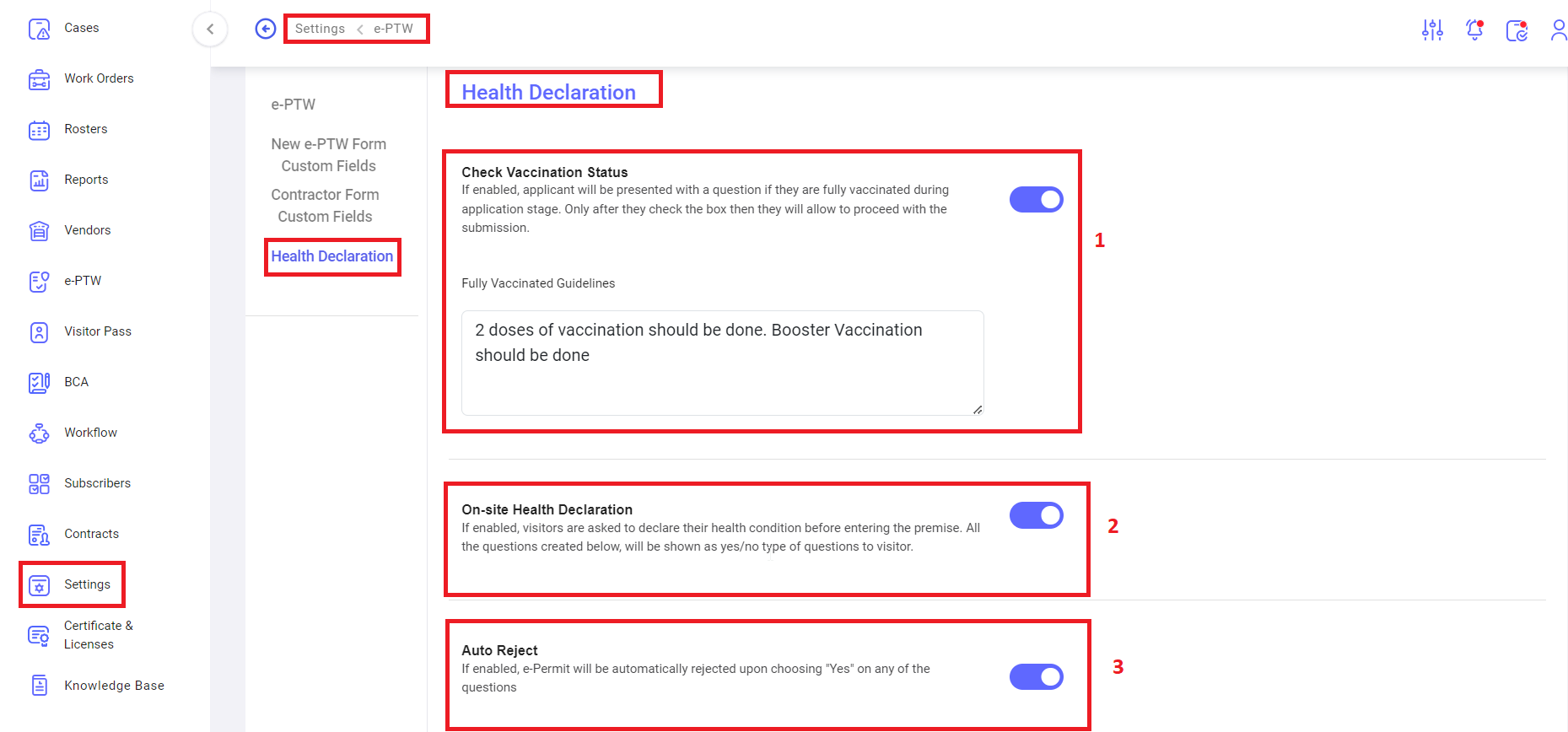
[![settings- e-ptw - health declr1.png](https://kb.asseto.ai/uploads/images/gallery/2024-09/embedded-image-2immix3z.png)](http://ec2-3-7-68-25.ap-south-1.compute.amazonaws.com/uploads/images/gallery/2024-08/settings-e-ptw-health-declr1.png)

<span style="mso-bidi-font-family: Calibri; mso-bidi-theme-font: minor-latin;"><span style="mso-list: Ignore;">1.<span style="font: 7.0pt 'Times New Roman';"> </span></span></span><u>Check Vaccination status</u>: If enabled, applicant will be presented with a question if they are fully vaccinated during application stage. Only after they check the box then they will allow to proceed with the submission.

<span style="font-family: Symbol; mso-fareast-font-family: Symbol; mso-bidi-font-family: Symbol;"><span style="mso-list: Ignore;">·<span style="font: 7.0pt 'Times New Roman';"> </span></span></span>Fully vaccinated Guidelines: Here user can add/remove fully vaccinated guidelines.

<span style="mso-bidi-font-family: Calibri; mso-bidi-theme-font: minor-latin;"><span style="mso-list: Ignore;">2.<span style="font: 7.0pt 'Times New Roman';"> </span></span></span><u>On-site Health Declaration</u>: If enabled, visitors are asked to declare their health condition before entering the premise. All the questions created below, will be shown as yes/no type of questions to visitor.

<span style="mso-bidi-font-family: Calibri; mso-bidi-theme-font: minor-latin;"><span style="mso-list: Ignore;">3.<span style="font: 7.0pt 'Times New Roman';"> </span></span></span><u>Auto Reject</u>: If enabled, e-Permit will be automatically rejected upon choosing "Yes" on any of the questions.

[![settings- e-ptw - health declr2.png](https://kb.asseto.ai/uploads/images/gallery/2024-09/embedded-image-gck7dmtk.png)](http://ec2-3-7-68-25.ap-south-1.compute.amazonaws.com/uploads/images/gallery/2024-08/settings-e-ptw-health-declr2.png)
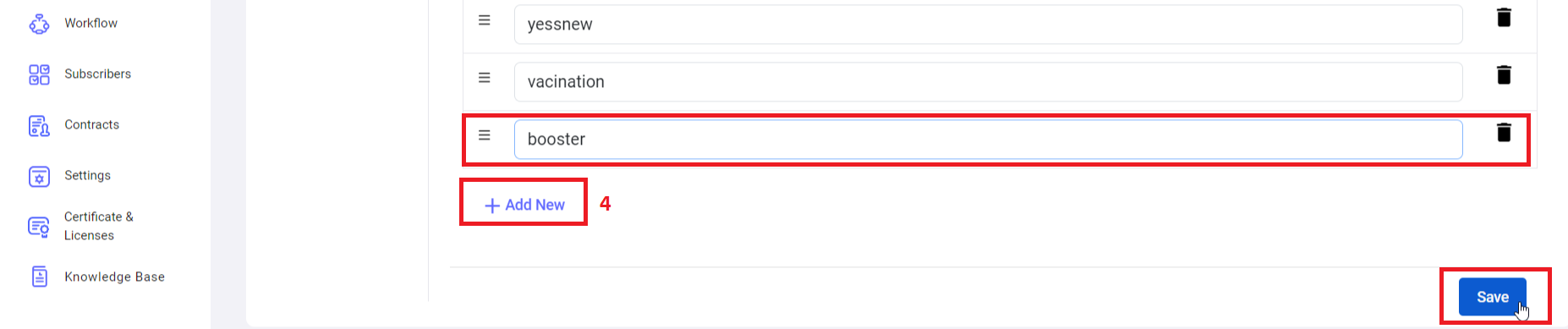
 <span style="mso-bidi-font-family: Calibri; mso-bidi-theme-font: minor-latin;"><span style="mso-list: Ignore;">4.<span style="font: 7.0pt 'Times New Roman';"> </span></span></span><u>Add New</u>: to add/configure the question, added questions are display in the above table. Delete option available for to delete the question.

<div class="page-content" dir="auto" id="bkmrk--15">---

</div>