# 7.6. Bulk Upload

Download the CSV file, complete the required fields and upload it to assign multiple shifts to multiple users simultaneously.

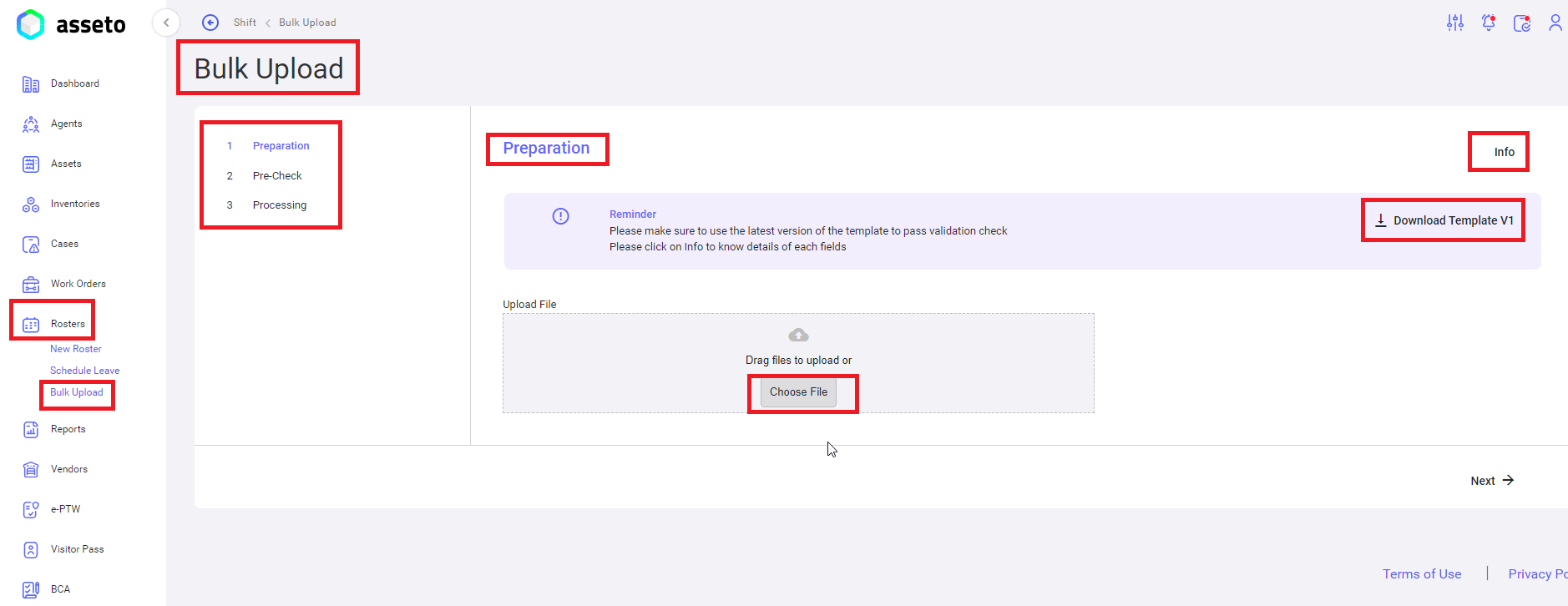
**<span lang="EN-US" style="mso-ansi-language: EN-US;">Left Menu -&gt; Rosters -&gt; Bulk Upload</span>**

[![Roasters-bulk1.png](https://kb.asseto.ai/uploads/images/gallery/2024-09/embedded-image-d5ddigsn.png)](http://ec2-3-7-68-25.ap-south-1.compute.amazonaws.com/uploads/images/gallery/2024-08/roasters-bulk1.png)

<span lang="EN-US" style="mso-ansi-language: EN-US;">It has 3 sections, those are</span>

**<span lang="EN-US" style="mso-ansi-language: EN-US;">1. Preparation</span>**<span lang="EN-US" style="mso-ansi-language: EN-US;">: To download the bulk upload template.</span>

**<span lang="EN-US" style="mso-ansi-language: EN-US;">2. Precheck</span>**<span lang="EN-US" style="mso-ansi-language: EN-US;">: validation check: To check for any errors in the uploaded sheet.</span>

**<span lang="EN-US" style="mso-ansi-language: EN-US;">3. Processing</span>**<span lang="EN-US" style="mso-ansi-language: EN-US;">: To view the progress on the bulk upload process.</span>

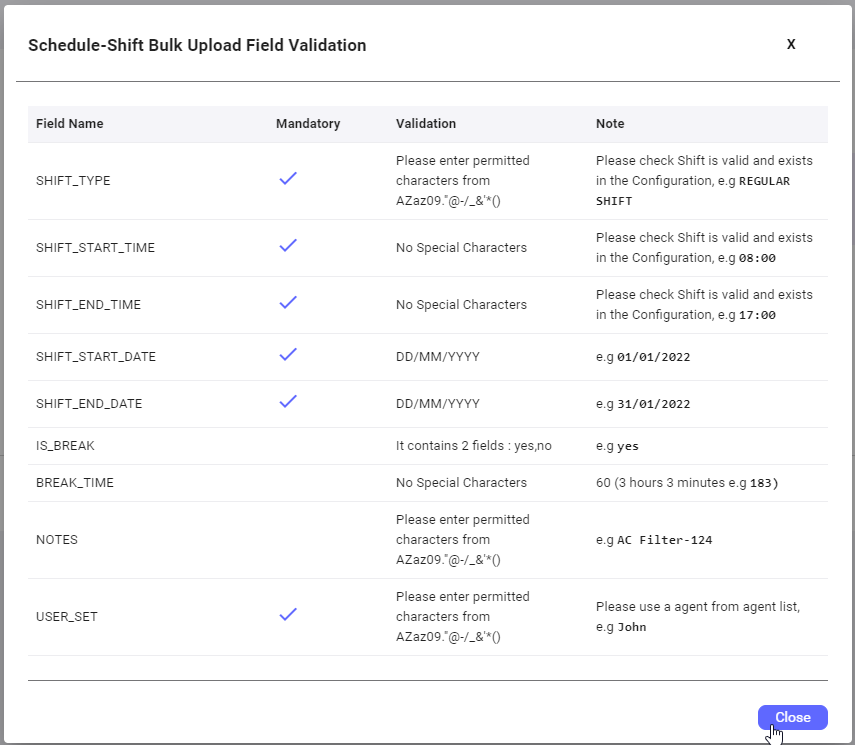
**<u><span lang="EN-US" style="mso-ansi-language: EN-US;">Info button</span></u>**<span lang="EN-US" style="mso-ansi-language: EN-US;">: users can view the fields validation rules to fill the values in csv file accordingly.</span>

[![Roasters-bulk2.png](https://kb.asseto.ai/uploads/images/gallery/2024-09/embedded-image-iedgkvaa.png)](http://ec2-3-7-68-25.ap-south-1.compute.amazonaws.com/uploads/images/gallery/2024-08/roasters-bulk2.png)

<span style="mso-bidi-font-family: Calibri; mso-bidi-theme-font: minor-latin;">**1. Preparation**</span><span style="mso-bidi-font-family: Calibri; mso-bidi-theme-font: minor-latin;">:</span><span style="mso-bidi-font-family: Calibri; mso-bidi-theme-font: minor-latin;"> click on download template button to download csv file will be available in your local pc downloads folder as shown by following screenshot.</span>

[![Roasters-bulk3.png](https://kb.asseto.ai/uploads/images/gallery/2024-09/embedded-image-7h7htzid.png)](http://ec2-3-7-68-25.ap-south-1.compute.amazonaws.com/uploads/images/gallery/2024-08/roasters-bulk3.png)

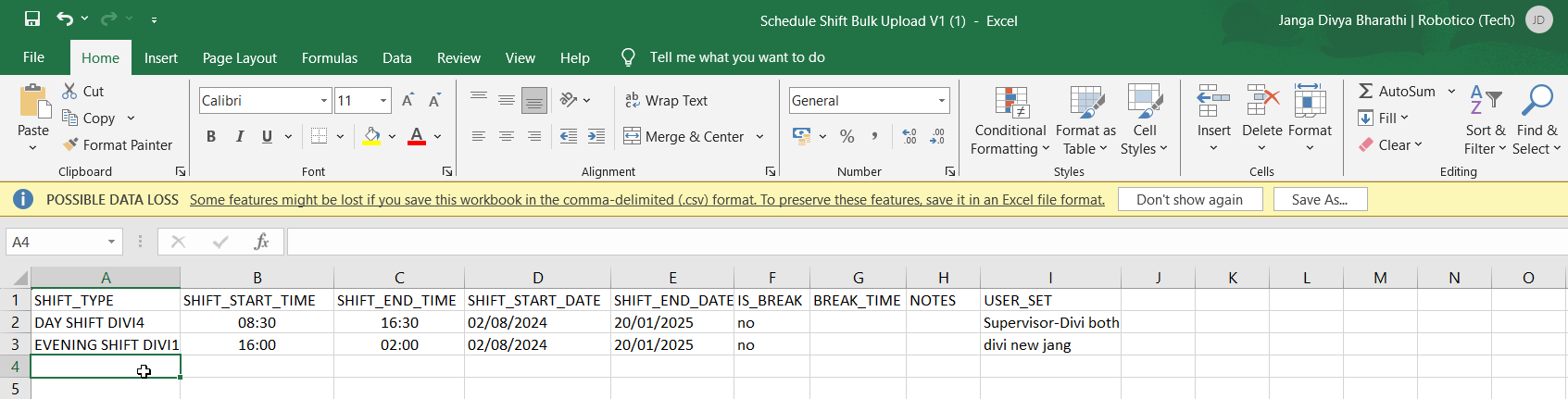
<span style="mso-bidi-font-family: Calibri; mso-bidi-theme-font: minor-latin;">Fill the data on the downloaded csv file for all shifts to be assigned to agents using bulk upload.</span>

[![Roasters-bulk4.png](https://kb.asseto.ai/uploads/images/gallery/2024-09/embedded-image-dfvdyld2.png)](http://ec2-3-7-68-25.ap-south-1.compute.amazonaws.com/uploads/images/gallery/2024-08/roasters-bulk4.png)

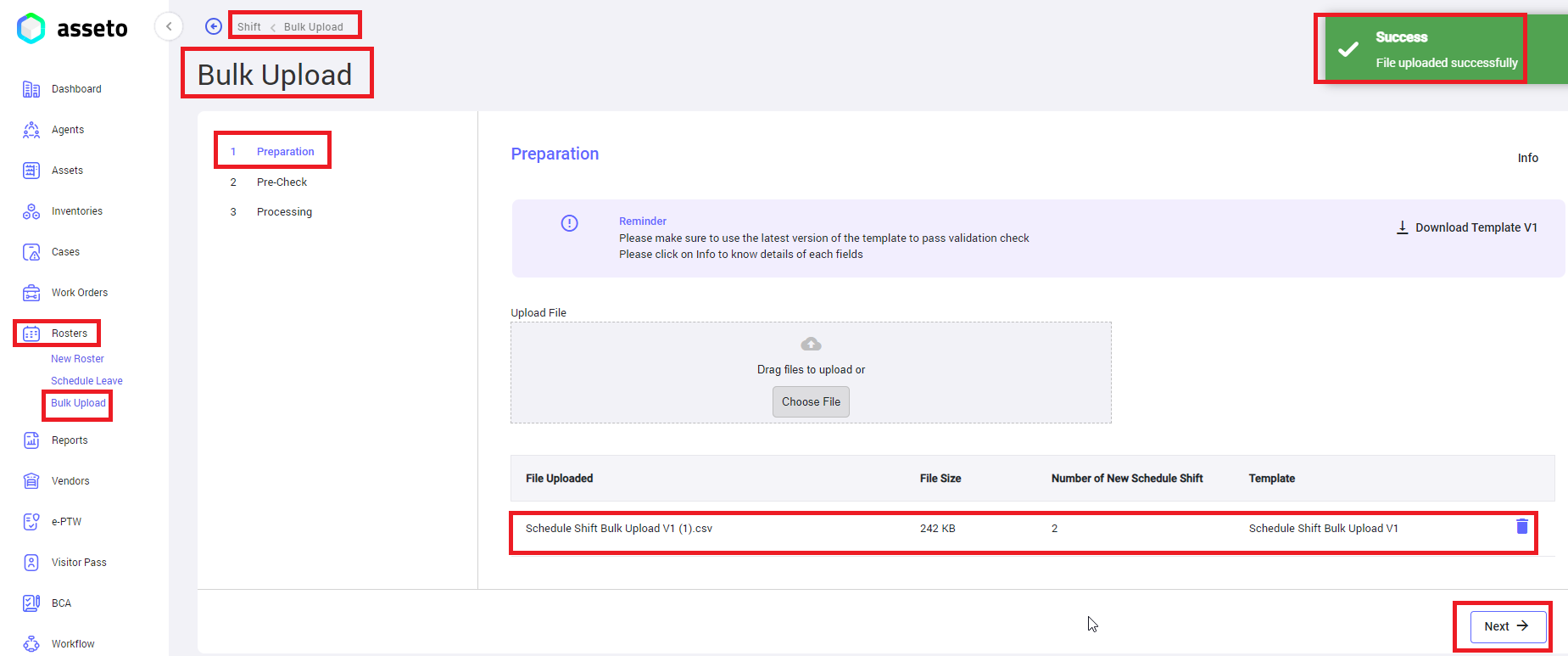
<span style="mso-bidi-font-family: Calibri; mso-bidi-theme-font: minor-latin;">Upload the file by clicking on choose file button on the bulk upload page.</span>

[![Roasters-bulk5.png](https://kb.asseto.ai/uploads/images/gallery/2024-09/embedded-image-rld1swie.png)](http://ec2-3-7-68-25.ap-south-1.compute.amazonaws.com/uploads/images/gallery/2024-08/roasters-bulk5.png)

<span style="mso-bidi-font-family: Calibri; mso-bidi-theme-font: minor-latin;">After uploading the csv file ‘Next’ button will be enabled, you can click on next button the system will navigate to validation check page.</span>

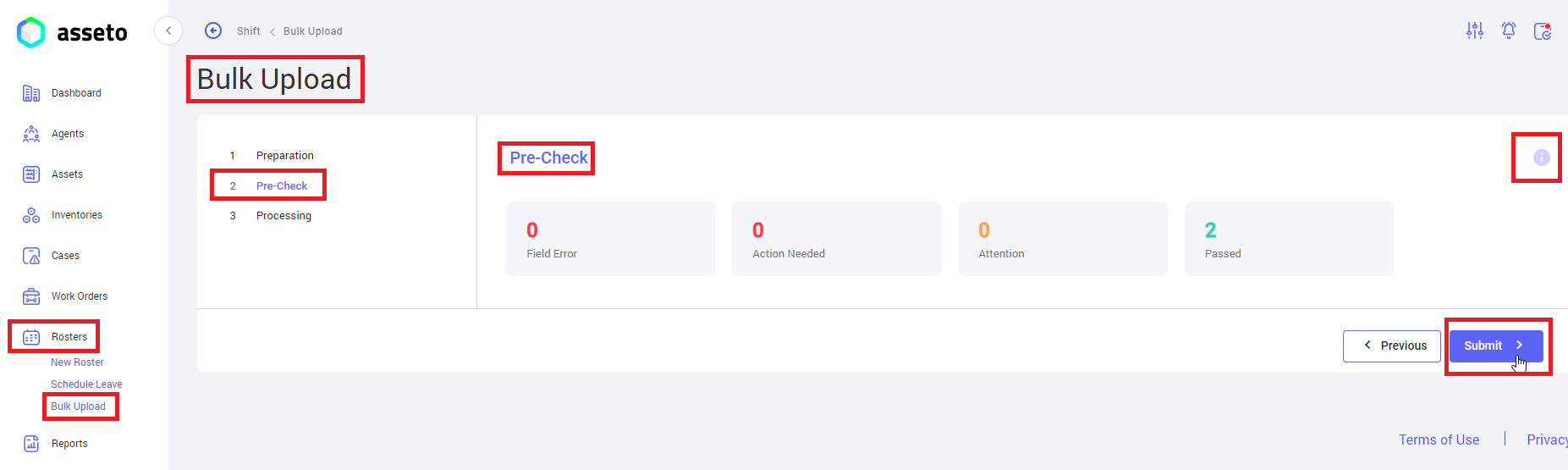
**<span style="mso-bidi-font-family: Calibri; mso-bidi-theme-font: minor-latin;">2. </span><span style="mso-bidi-font-family: Calibri; mso-bidi-theme-font: minor-latin;">Precheck/validation check</span>**<span style="mso-bidi-font-family: Calibri; mso-bidi-theme-font: minor-latin;">: If uploaded file having any errors will be display here, user will not be able to move to next stage unless those errors are corrected, submit button enabled (as shown by below screenshot) if no errors in your csv file.</span>

[![Roasters-bulk6.png](https://kb.asseto.ai/uploads/images/gallery/2024-09/embedded-image-tfkap9jf.png)](http://ec2-3-7-68-25.ap-south-1.compute.amazonaws.com/uploads/images/gallery/2024-08/roasters-bulk6.png)

<span style="mso-bidi-font-family: Calibri; mso-bidi-theme-font: minor-latin;">If there are no errors user can view passed count (i.e. number of scheduled shifts) submit button enabled. Click on the submit button system will navigate to next page.</span>

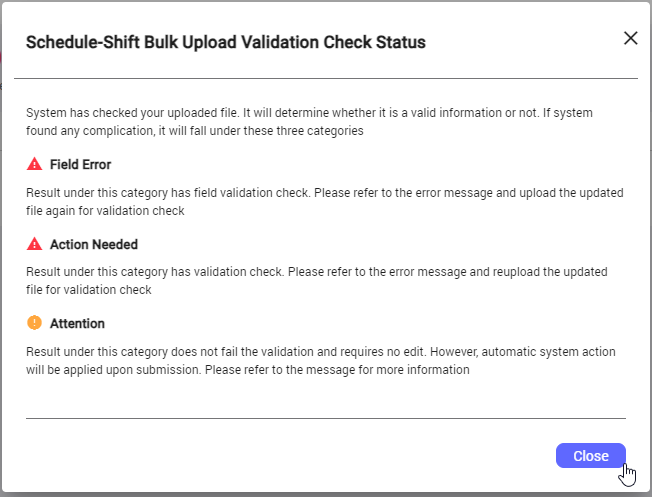
<span style="mso-bidi-font-family: Calibri; mso-bidi-theme-font: minor-latin;">**Note**: Click on the tooltip (icon) to check the validation status on validation/pre-check page.</span>

[![Roasters-bulk7.png](https://kb.asseto.ai/uploads/images/gallery/2024-09/embedded-image-excn3o7a.png)](http://ec2-3-7-68-25.ap-south-1.compute.amazonaws.com/uploads/images/gallery/2024-08/roasters-bulk7.png)

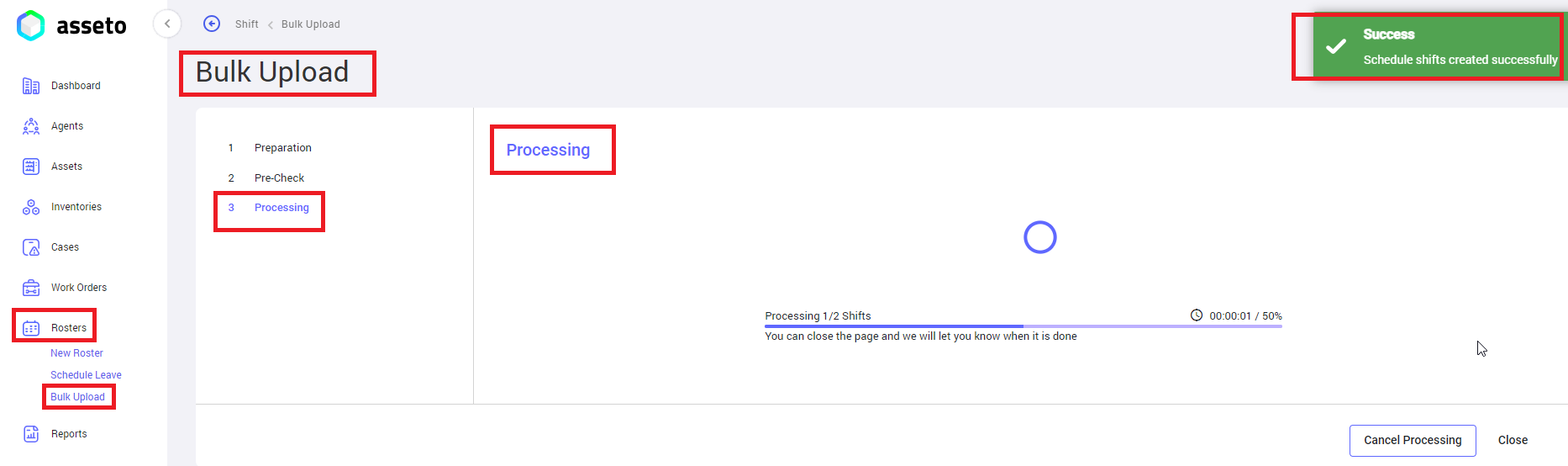
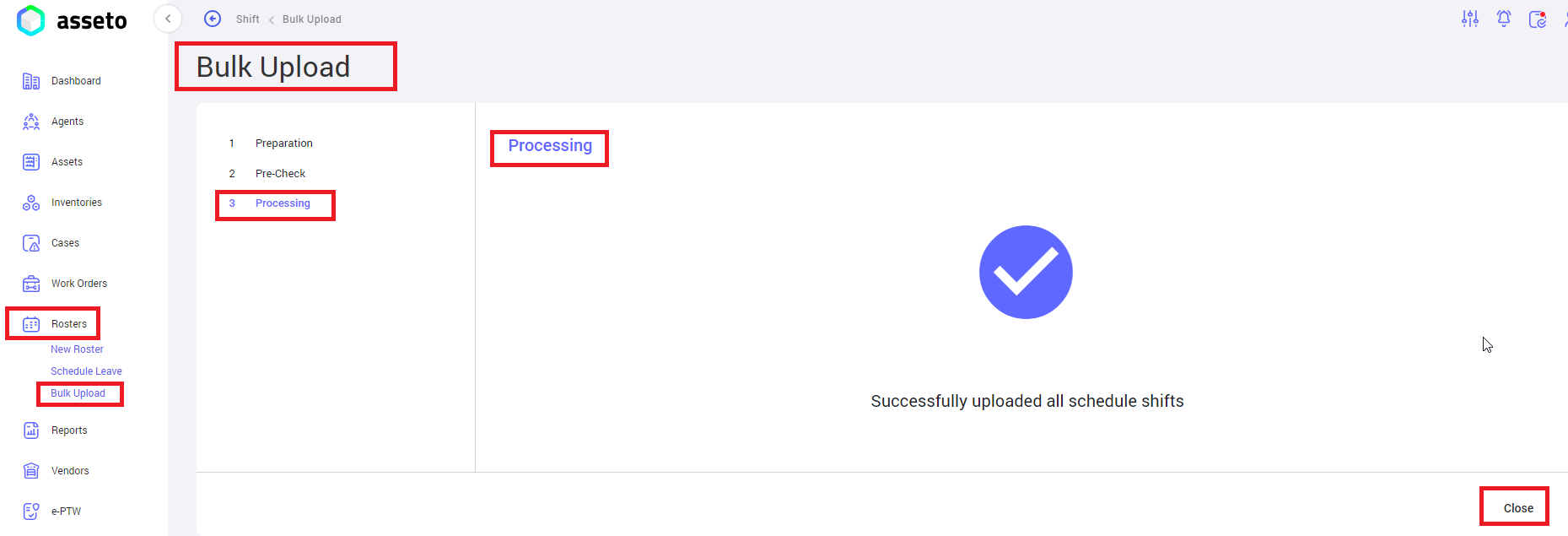
**<span style="mso-bidi-font-family: Calibri; mso-bidi-theme-font: minor-latin;">3. </span><span style="mso-bidi-font-family: Calibri; mso-bidi-theme-font: minor-latin;">Processing</span>**<span style="mso-bidi-font-family: Calibri; mso-bidi-theme-font: minor-latin;">: User can view the progress of bulk upload to the application. “Scheduled shifts created successfully” confirmation message will be displayed.</span>

[![Roasters-bulk8.png](https://kb.asseto.ai/uploads/images/gallery/2024-09/embedded-image-gtgbslq5.png)](http://ec2-3-7-68-25.ap-south-1.compute.amazonaws.com/uploads/images/gallery/2024-08/roasters-bulk8.png)

<span style="mso-bidi-font-family: Calibri; mso-bidi-theme-font: minor-latin;"><span style="font-size: 11.0pt; line-height: 107%; font-family: 'Calibri',sans-serif; mso-ascii-theme-font: minor-latin; mso-fareast-font-family: Calibri; mso-fareast-theme-font: minor-latin; mso-hansi-theme-font: minor-latin; mso-bidi-theme-font: minor-latin; mso-ansi-language: EN-MY; mso-fareast-language: EN-US; mso-bidi-language: AR-SA;">Next</span></span>

[![Roasters-bulk9.png](https://kb.asseto.ai/uploads/images/gallery/2024-09/embedded-image-wtjx3btb.png)](http://ec2-3-7-68-25.ap-south-1.compute.amazonaws.com/uploads/images/gallery/2024-08/roasters-bulk9.png)

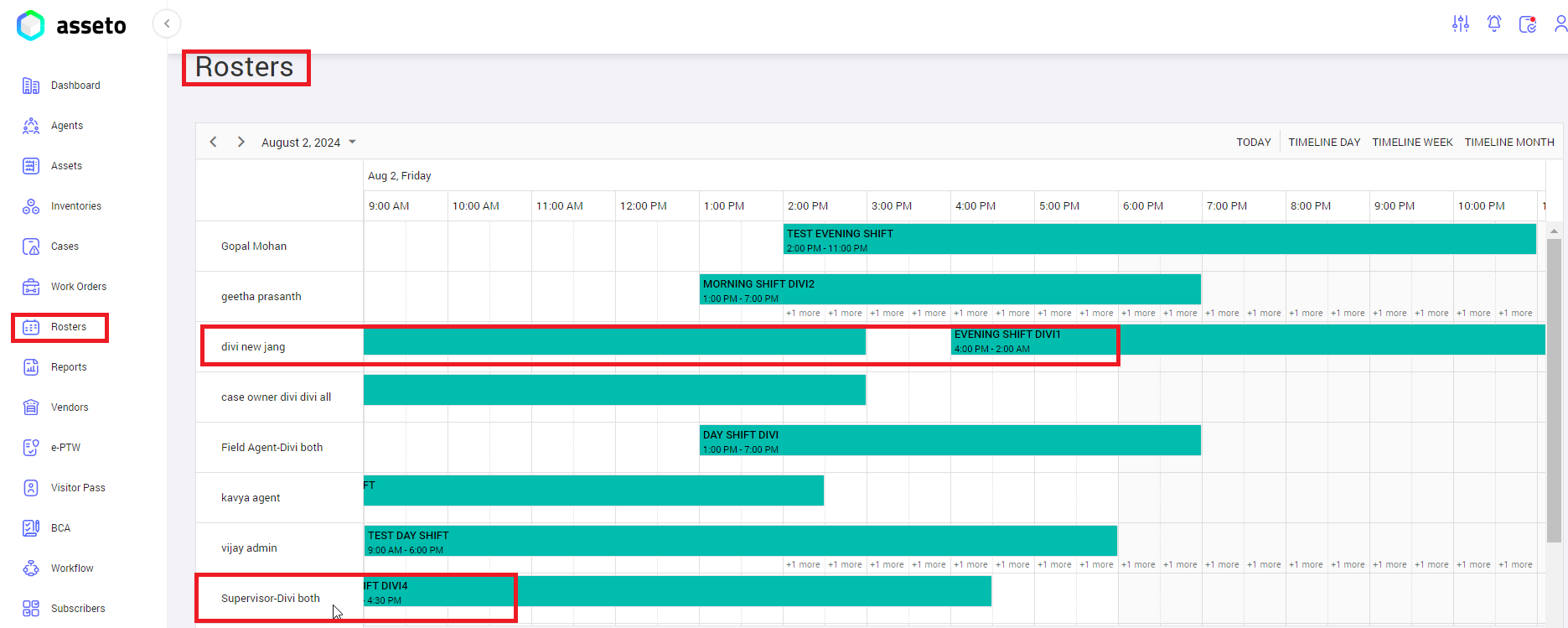
<span style="mso-bidi-font-family: Calibri; mso-bidi-theme-font: minor-latin;">Click on close. added scheduled shifts through bulk upload will be displayed on the rosters page timeline list as shown by following screenshot.</span>

[![Roasters-bulk10.png](https://kb.asseto.ai/uploads/images/gallery/2024-09/embedded-image-ttmicg40.png)](http://ec2-3-7-68-25.ap-south-1.compute.amazonaws.com/uploads/images/gallery/2024-08/roasters-bulk10.png)

<div class="page-content" dir="auto" id="bkmrk--10">---

<div class="text-muted text-small"><div class="entity-meta">  
</div></div></div>