# 17.1 Certificates & License Dashboard

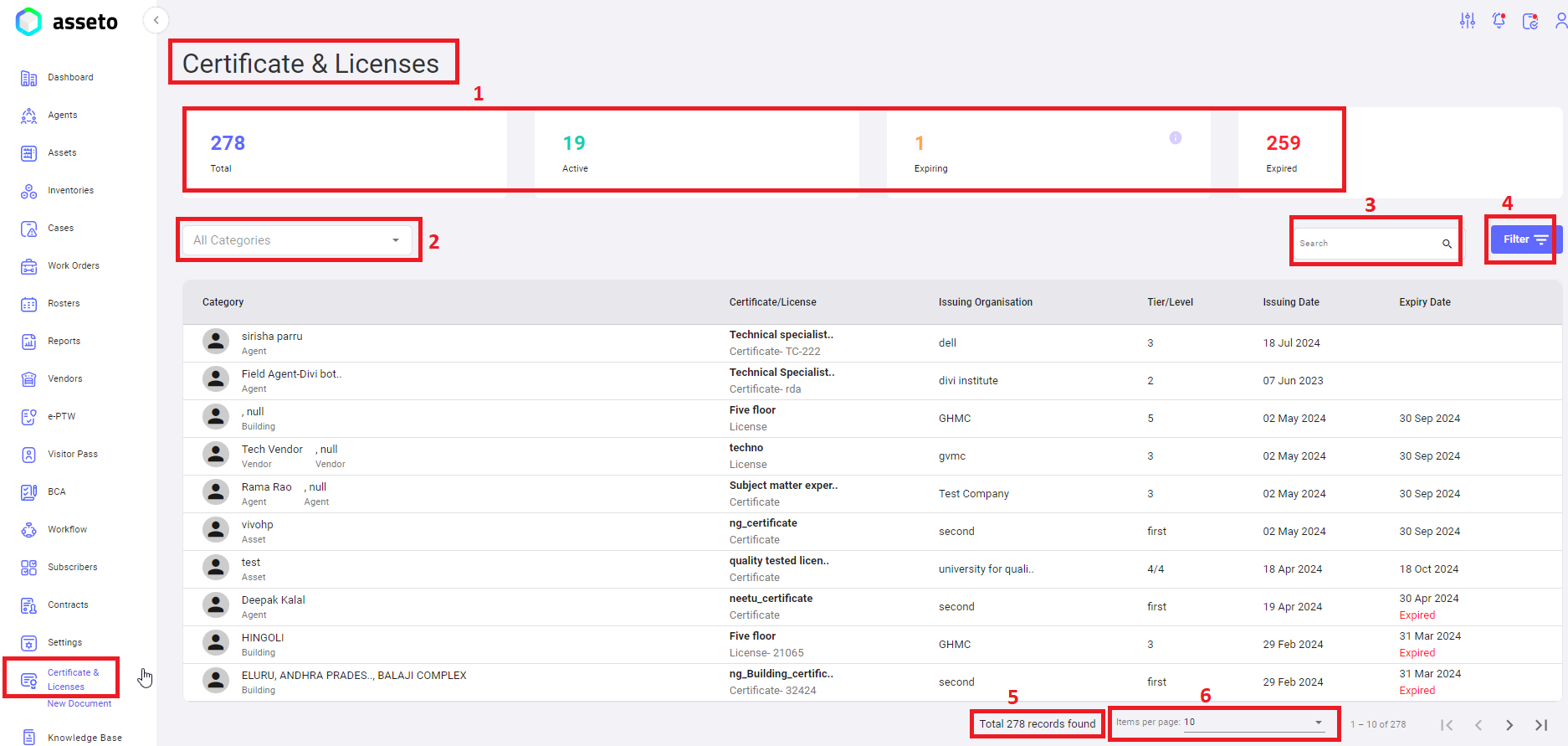
Certificates &amp; licenses dashboard having <span lang="EN-US" style="mso-ansi-language: EN-US;">following features.</span>

[![C&L-1.png](https://kb.asseto.ai/uploads/images/gallery/2024-09/embedded-image-aixrzmf1.png)](http://ec2-3-7-68-25.ap-south-1.compute.amazonaws.com/uploads/images/gallery/2024-08/cl-1.png)

 **<span lang="EN-US" style="mso-bidi-font-family: Calibri; mso-bidi-theme-font: minor-latin; mso-ansi-language: EN-US;"><span style="mso-list: Ignore;">1.<span style="font-style: normal; font-variant: normal; font-kerning: auto; font-optical-sizing: auto; font-feature-settings: normal; font-variation-settings: normal; font-stretch: normal; font-size: 7pt; line-height: normal; font-family: 'Times New Roman';"> </span></span></span><span lang="EN-US" style="mso-ansi-language: EN-US;">Statuses</span>**<span lang="EN-US" style="mso-ansi-language: EN-US;">**:** </span>The wedges display the count of total number of documents in the system, total number of active, expiring, and expired till date.

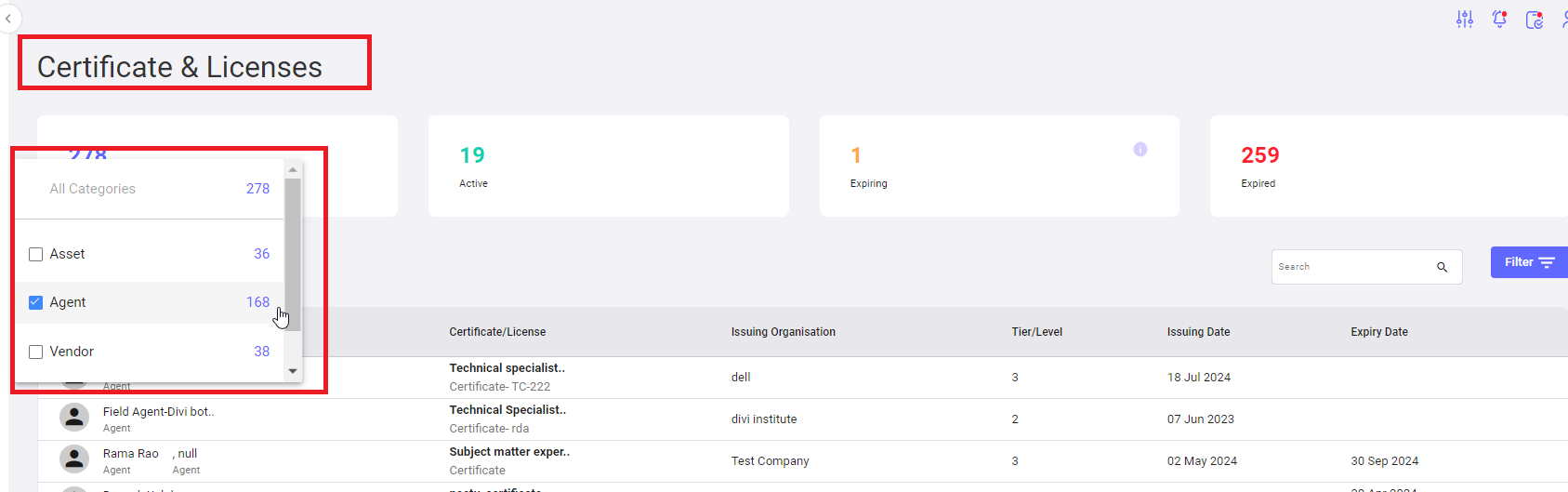
**<span lang="EN-US" style="mso-bidi-font-family: Calibri; mso-bidi-theme-font: minor-latin; mso-ansi-language: EN-US;"><span style="mso-list: Ignore;">2.<span style="font-style: normal; font-variant: normal; font-kerning: auto; font-optical-sizing: auto; font-feature-settings: normal; font-variation-settings: normal; font-stretch: normal; font-size: 7pt; line-height: normal; font-family: 'Times New Roman';"> </span></span></span><span lang="EN-US" style="mso-ansi-language: EN-US;">Dropdown</span>**<span lang="EN-US" style="mso-ansi-language: EN-US;">**:** To search documents with categories like, asset, agent, vendor. Select any category from the dropdown.</span>

[![C&L-2.png](https://kb.asseto.ai/uploads/images/gallery/2024-09/embedded-image-9ozcxvkx.png)](http://ec2-3-7-68-25.ap-south-1.compute.amazonaws.com/uploads/images/gallery/2024-08/cl-2.png)

Results will be displayed in Certificates &amp; licenses dashboard <span lang="EN-US" style="mso-ansi-language: EN-US;">documents </span>list as shown by the following screenshot.

[![C&L-3.png](https://kb.asseto.ai/uploads/images/gallery/2024-09/embedded-image-koa85wfl.png)](http://ec2-3-7-68-25.ap-south-1.compute.amazonaws.com/uploads/images/gallery/2024-08/cl-3.png)
 **<span lang="EN-US" style="mso-bidi-font-family: Calibri; mso-bidi-theme-font: minor-latin; mso-ansi-language: EN-US;"><span style="mso-list: Ignore;">3.<span style="font-style: normal; font-variant: normal; font-kerning: auto; font-optical-sizing: auto; font-feature-settings: normal; font-variation-settings: normal; font-stretch: normal; font-size: 7pt; line-height: normal; font-family: 'Times New Roman';"> </span></span></span><span lang="EN-US" style="mso-ansi-language: EN-US;">Search Bar</span>**<span lang="EN-US" style="mso-ansi-language: EN-US;">**:** </span>User can search for any specific document with name.

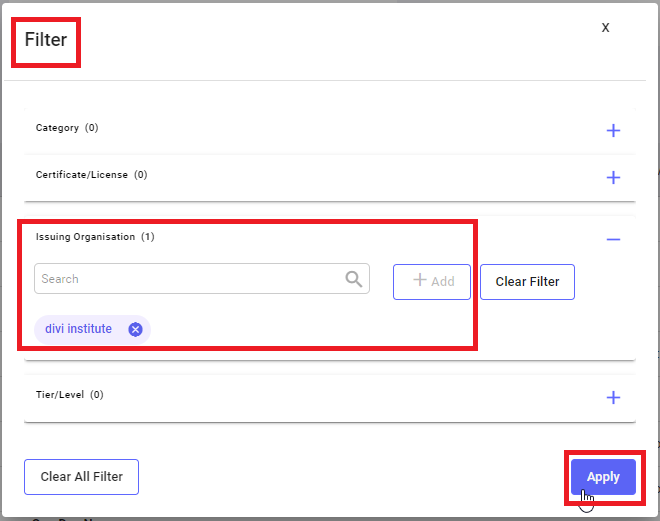
**<span lang="EN-US" style="mso-bidi-font-family: Calibri; mso-bidi-theme-font: minor-latin; mso-ansi-language: EN-US;"><span style="mso-list: Ignore;">4.<span style="font-style: normal; font-variant: normal; font-kerning: auto; font-optical-sizing: auto; font-feature-settings: normal; font-variation-settings: normal; font-stretch: normal; font-size: 7pt; line-height: normal; font-family: 'Times New Roman';"> </span></span></span><span lang="EN-US" style="mso-ansi-language: EN-US;">Filter</span>**<span lang="EN-US" style="mso-ansi-language: EN-US;">**:** </span>To filter out the assets information by selecting choice of filter from the list like, asset category, manufacturer, model, etc. when you click on the filter icon following screen will be displayed, you can select choice of filter and click on add button then click on apply button<span style="mso-ansi-language: EN-US;"> <span lang="EN-US">as shown by below screenshot</span></span>.

[![C&L-4.png](https://kb.asseto.ai/uploads/images/gallery/2024-09/embedded-image-dcmcjoj7.png)](http://ec2-3-7-68-25.ap-south-1.compute.amazonaws.com/uploads/images/gallery/2024-08/cl-4.png)

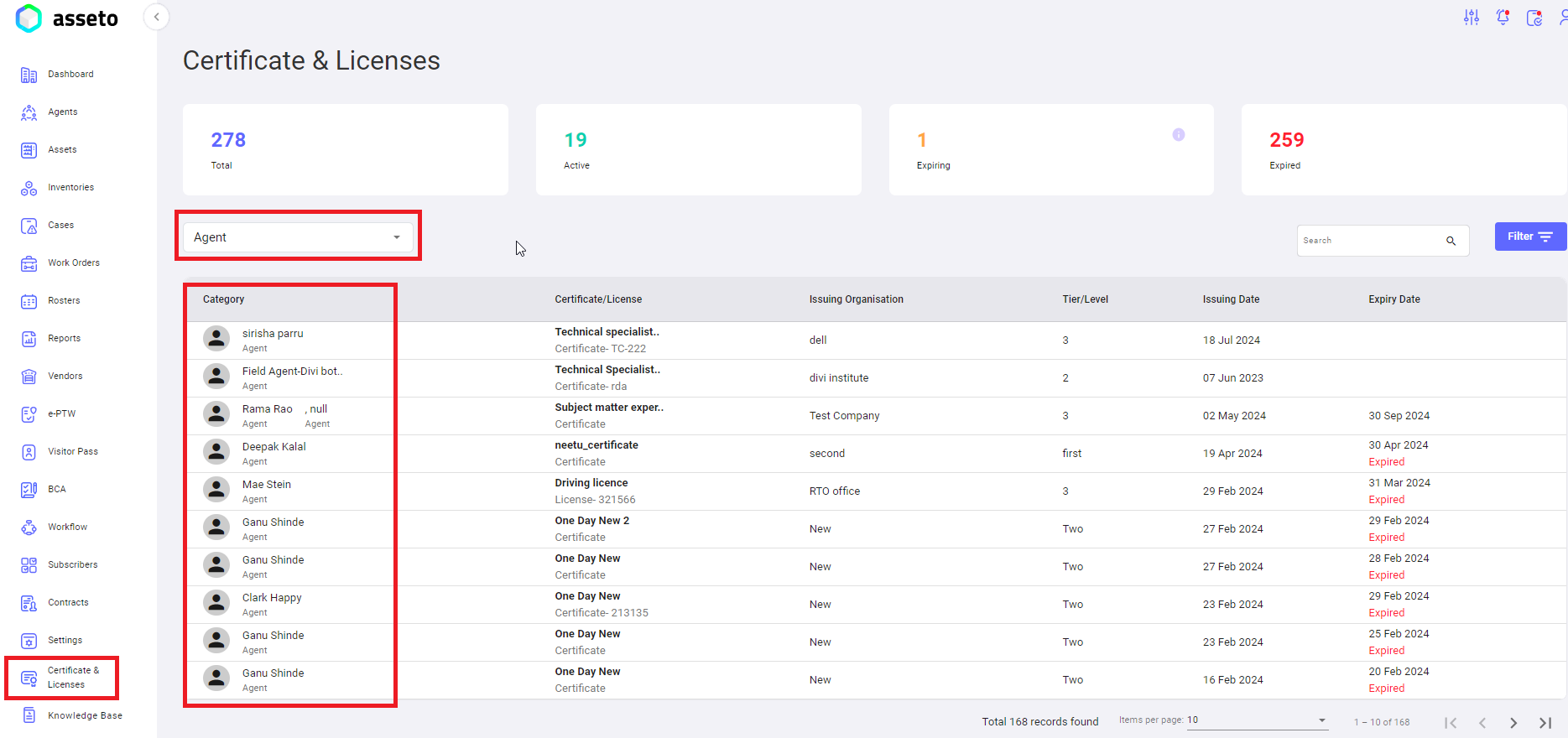
Filter results will be display in Certificates &amp; licenses dashboard as shown by the following screenshot.

[![C&L-5.png](https://kb.asseto.ai/uploads/images/gallery/2024-09/embedded-image-ycwpco8n.png)](http://ec2-3-7-68-25.ap-south-1.compute.amazonaws.com/uploads/images/gallery/2024-08/cl-5.png)
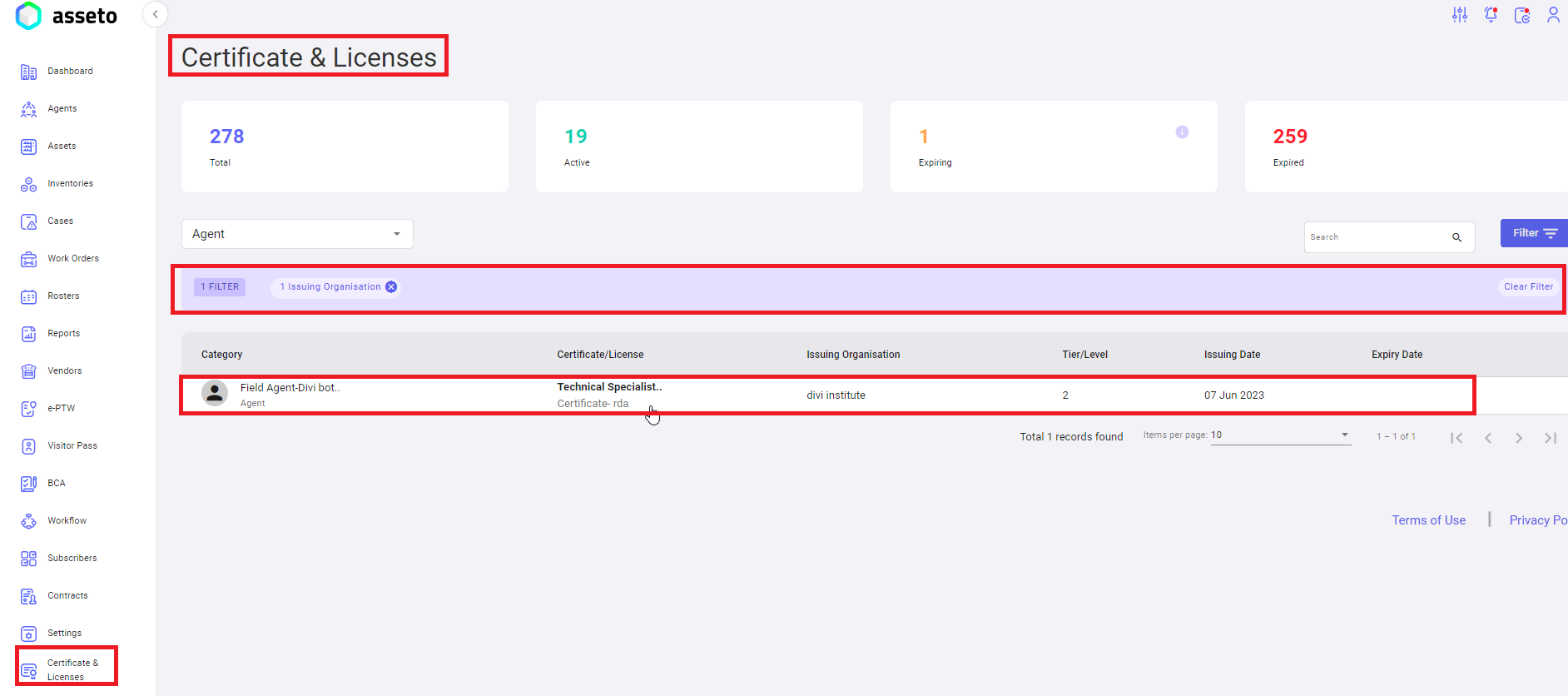
 **<span style="mso-bidi-font-family: Calibri; mso-bidi-theme-font: minor-latin;"><span style="mso-list: Ignore;">5.<span style="font-style: normal; font-variant: normal; font-kerning: auto; font-optical-sizing: auto; font-feature-settings: normal; font-variation-settings: normal; font-stretch: normal; font-size: 7pt; line-height: normal; font-family: 'Times New Roman';"> </span></span></span><span lang="EN-US" style="mso-ansi-language: EN-US;">Total Records</span>**<span lang="EN-US" style="mso-ansi-language: EN-US;">**:** T</span>otal number of documents present in the system displayed at the bottom of the documents table.

**<span style="mso-bidi-font-family: Calibri; mso-bidi-theme-font: minor-latin;"><span style="mso-list: Ignore;">6.<span style="font-style: normal; font-variant: normal; font-kerning: auto; font-optical-sizing: auto; font-feature-settings: normal; font-variation-settings: normal; font-stretch: normal; font-size: 7pt; line-height: normal; font-family: 'Times New Roman';"> </span></span></span><span lang="EN-US" style="mso-ansi-language: EN-US;">Pagination</span><span lang="EN-US" style="mso-ansi-language: EN-US;">: </span>**<span lang="EN-US" style="mso-ansi-language: EN-US;">P</span>agination view is displayed beside the total number of records, you can select the pagination numbers (5,10,25,50,100) to get the desired list.