# 11. IO T Gateway

User can configure Asset Gateway and Asset Controller Device. Options are available as menu on left side, Asset Gateway is highlighted by default.

[![settings- Io T Gateway1.png](https://kb.asseto.ai/uploads/images/gallery/2024-09/embedded-image-2blz09mn.png)](http://ec2-3-7-68-25.ap-south-1.compute.amazonaws.com/uploads/images/gallery/2024-08/settings-io-t-gateway1.png)
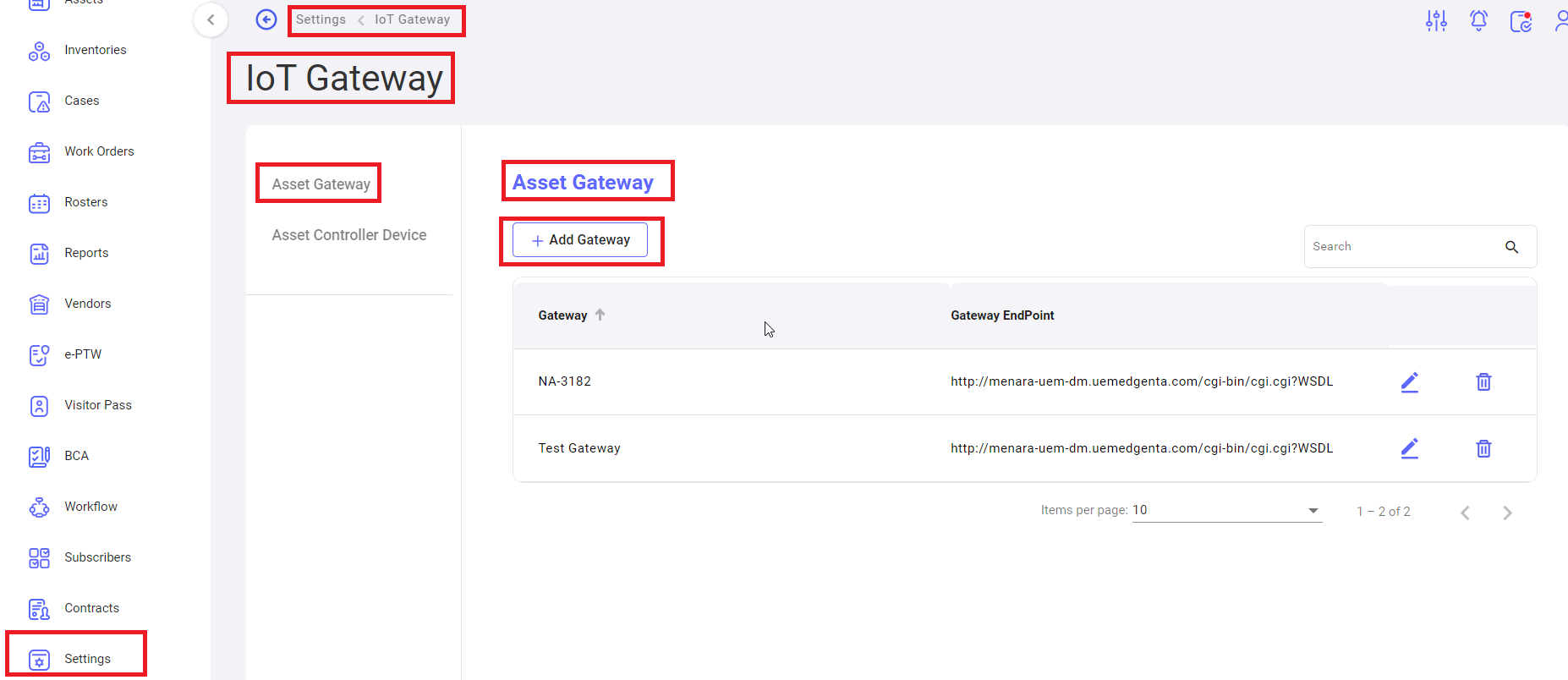
**<span style="mso-bidi-font-family: Calibri; mso-bidi-theme-font: minor-latin;"><span style="mso-list: Ignore;">i.<span style="font: 7.0pt 'Times New Roman';"> </span></span></span>****<span lang="EN-US" style="mso-bidi-font-family: Calibri; mso-bidi-theme-font: minor-latin; mso-ansi-language: EN-US;">Settings -&gt; Io T Gateway</span> -&gt; Asset Gateway**

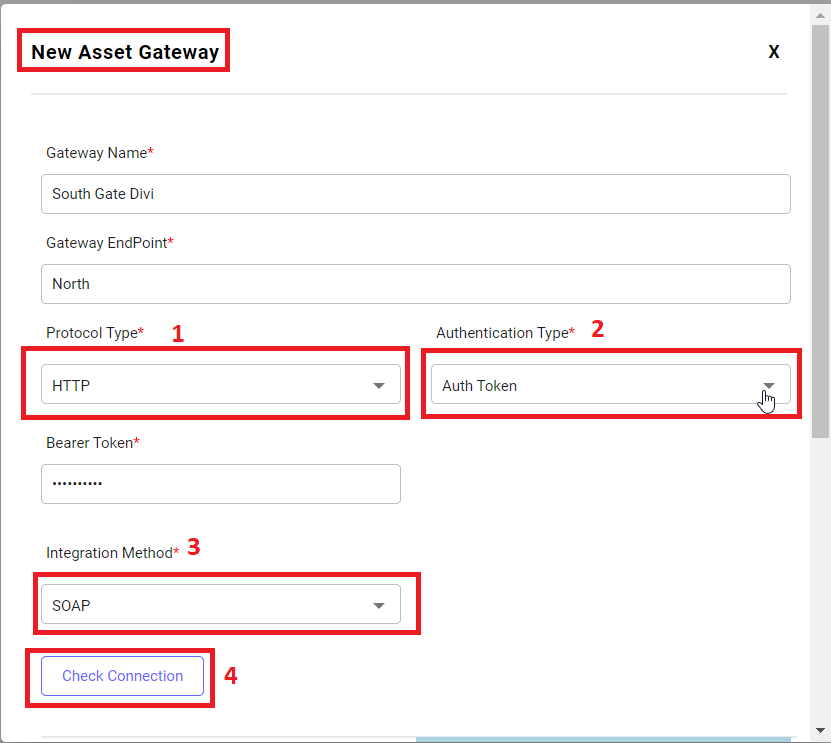
<u>Add Gateway</u>: Click on add gateway button, to add the gateway, following page will open.

[![settings- Io T Gateway2.png](https://kb.asseto.ai/uploads/images/gallery/2024-09/embedded-image-ymuqyfuv.png)](http://ec2-3-7-68-25.ap-south-1.compute.amazonaws.com/uploads/images/gallery/2024-08/settings-io-t-gateway2.png)
[![settings- Io T Gateway3.png](https://kb.asseto.ai/uploads/images/gallery/2024-09/embedded-image-pamdc6iu.png)](http://ec2-3-7-68-25.ap-south-1.compute.amazonaws.com/uploads/images/gallery/2024-08/settings-io-t-gateway3.png)
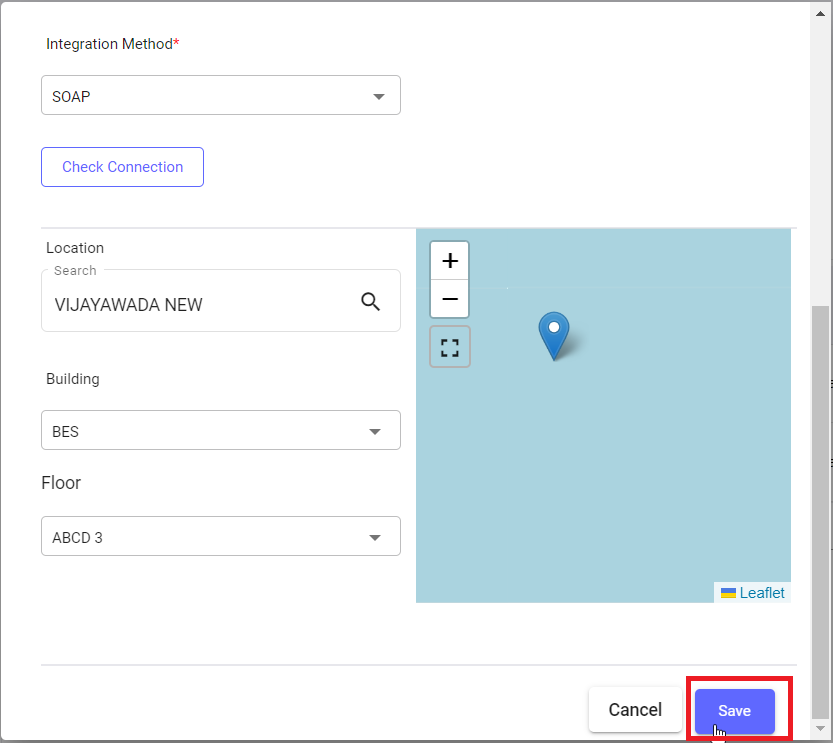
 Fill the all-mandatory fields.

<span style="mso-bidi-font-family: Calibri; mso-bidi-theme-font: minor-latin;"><span style="mso-list: Ignore;">1.<span style="font: 7.0pt 'Times New Roman';"> </span></span></span>Select protocol type from dropdown.

<span style="mso-bidi-font-family: Calibri; mso-bidi-theme-font: minor-latin;"><span style="mso-list: Ignore;">2.<span style="font: 7.0pt 'Times New Roman';"> </span></span></span>Select authentication type, when you select “auth token”, bearer token field will appear. When you select “user name, password”, user name and password fields are appeared.

<span style="mso-bidi-font-family: Calibri; mso-bidi-theme-font: minor-latin;"><span style="mso-list: Ignore;">3.<span style="font: 7.0pt 'Times New Roman';"> </span></span></span>Select integration method from dropdown.

<span style="mso-bidi-font-family: Calibri; mso-bidi-theme-font: minor-latin;"><span style="mso-list: Ignore;">4.<span style="font: 7.0pt 'Times New Roman';"> </span></span></span>Check connection: to check the connection between authentication type and bearer token/user name, password.

<span style="mso-bidi-font-family: Calibri; mso-bidi-theme-font: minor-latin;"><span style="mso-list: Ignore;">5.<span style="font: 7.0pt 'Times New Roman';"> </span></span></span>Save: click on “save” button to save the all details, system navigate to Io T gateway list page and confirmation message “Asset Gateway Registered successfully” will be display then saved record will be display in first row of the table.

[![settings- Io T Gateway4.png](https://kb.asseto.ai/uploads/images/gallery/2024-09/embedded-image-pr1jnfmk.png)](http://ec2-3-7-68-25.ap-south-1.compute.amazonaws.com/uploads/images/gallery/2024-08/settings-io-t-gateway4.png)
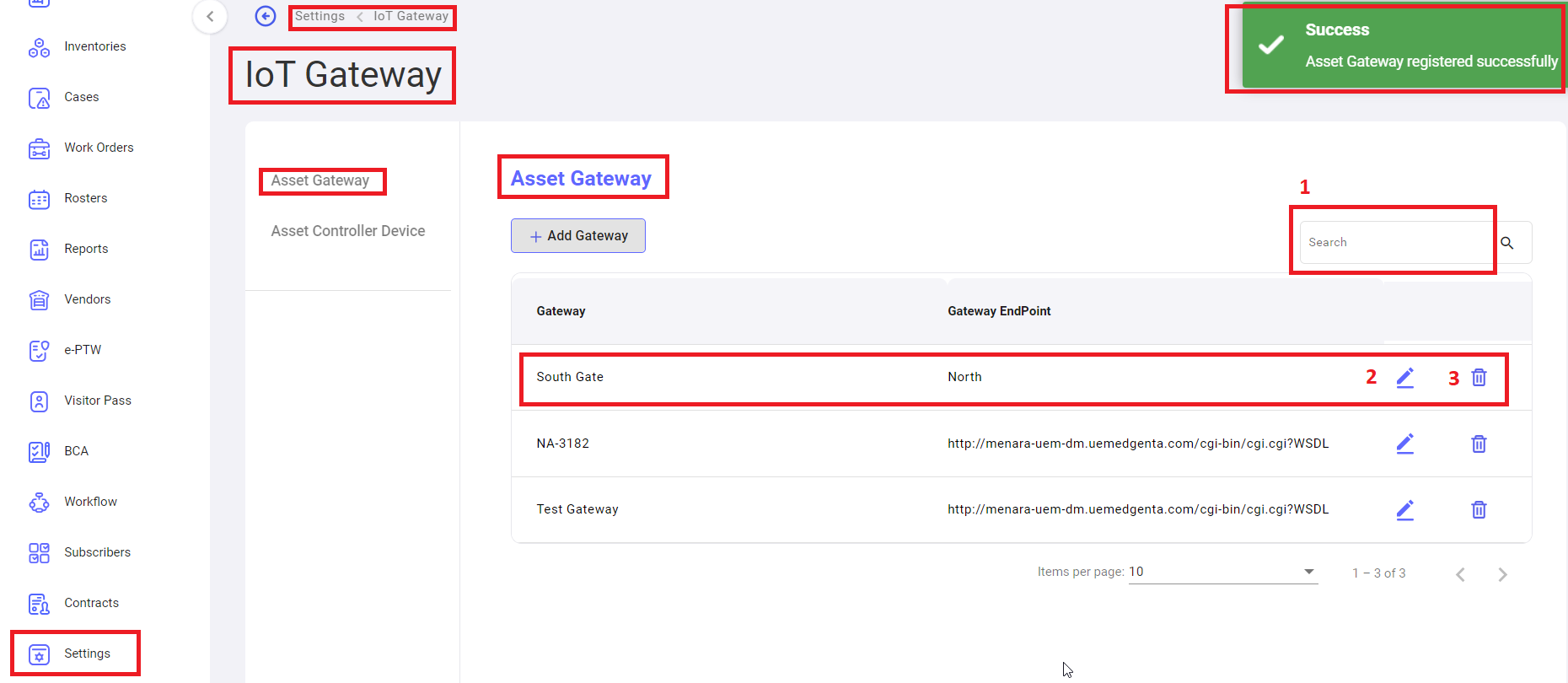
 <span style="mso-bidi-font-family: Calibri; mso-bidi-theme-font: minor-latin;"><span style="mso-list: Ignore;">1.<span style="font: 7.0pt 'Times New Roman';"> </span></span></span><u>Search</u>: to search the gateway with name.

<span style="mso-bidi-font-family: Calibri; mso-bidi-theme-font: minor-latin;"><span style="mso-list: Ignore;">2.<span style="font: 7.0pt 'Times New Roman';"> </span></span></span><u>Edit</u>: to edit the gateway.

<span style="mso-bidi-font-family: Calibri; mso-bidi-theme-font: minor-latin;"><span style="mso-list: Ignore;">3.<span style="font: 7.0pt 'Times New Roman';"> </span></span></span><u>Delete</u>: to delete the gateway.

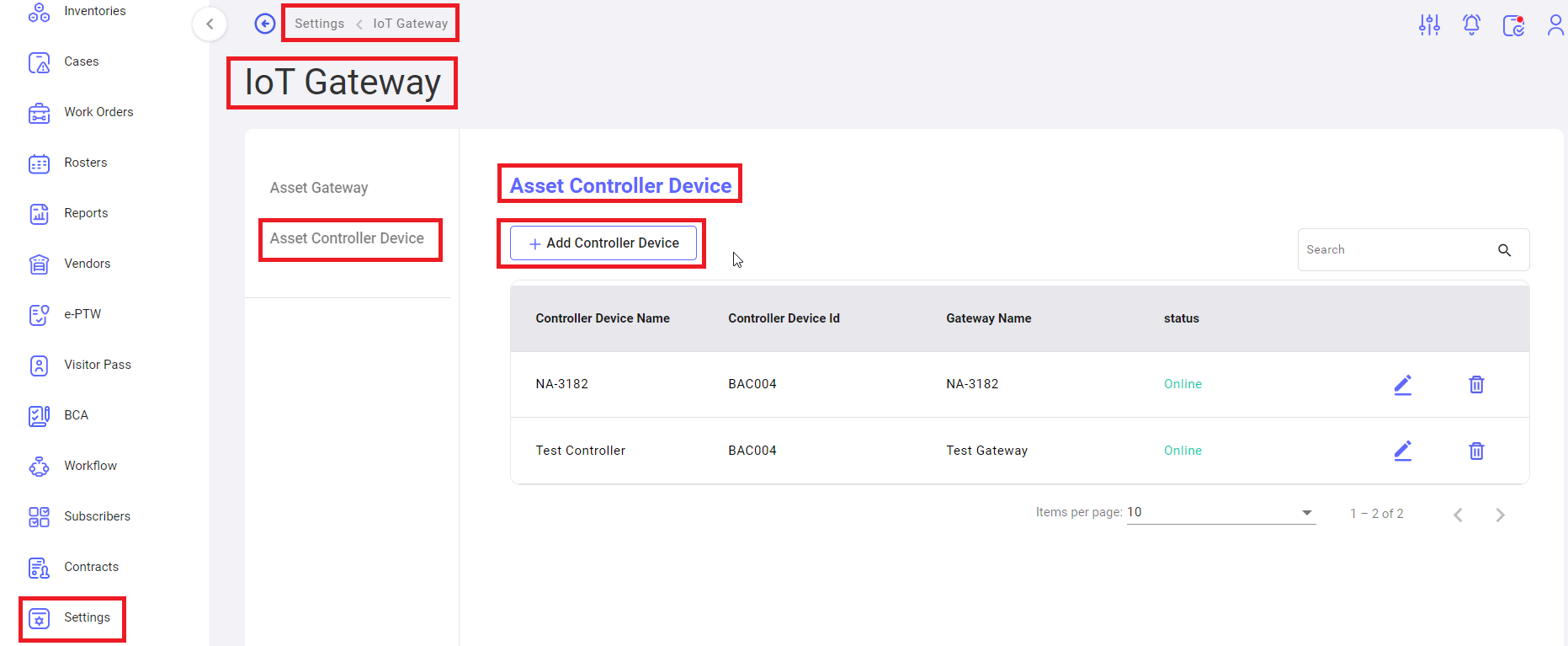
**<span style="mso-bidi-font-family: Calibri; mso-bidi-theme-font: minor-latin;"><span style="mso-list: Ignore;">ii.<span style="font: 7.0pt 'Times New Roman';"> </span></span></span>****<span lang="EN-US" style="mso-bidi-font-family: Calibri; mso-bidi-theme-font: minor-latin; mso-ansi-language: EN-US;">Settings -&gt; Io T Gateway</span> -&gt; Asset Controller Device**

[![settings- Io T Gateway5.png](https://kb.asseto.ai/uploads/images/gallery/2024-09/embedded-image-tcbthtlp.png)](http://ec2-3-7-68-25.ap-south-1.compute.amazonaws.com/uploads/images/gallery/2024-08/settings-io-t-gateway5.png)

<u>Add controller device</u>: click on button to add the controller device, following page will be open.

[![settings- Io T Gateway6.png](https://kb.asseto.ai/uploads/images/gallery/2024-09/embedded-image-scthg0ms.png)](http://ec2-3-7-68-25.ap-south-1.compute.amazonaws.com/uploads/images/gallery/2024-08/settings-io-t-gateway6.png)
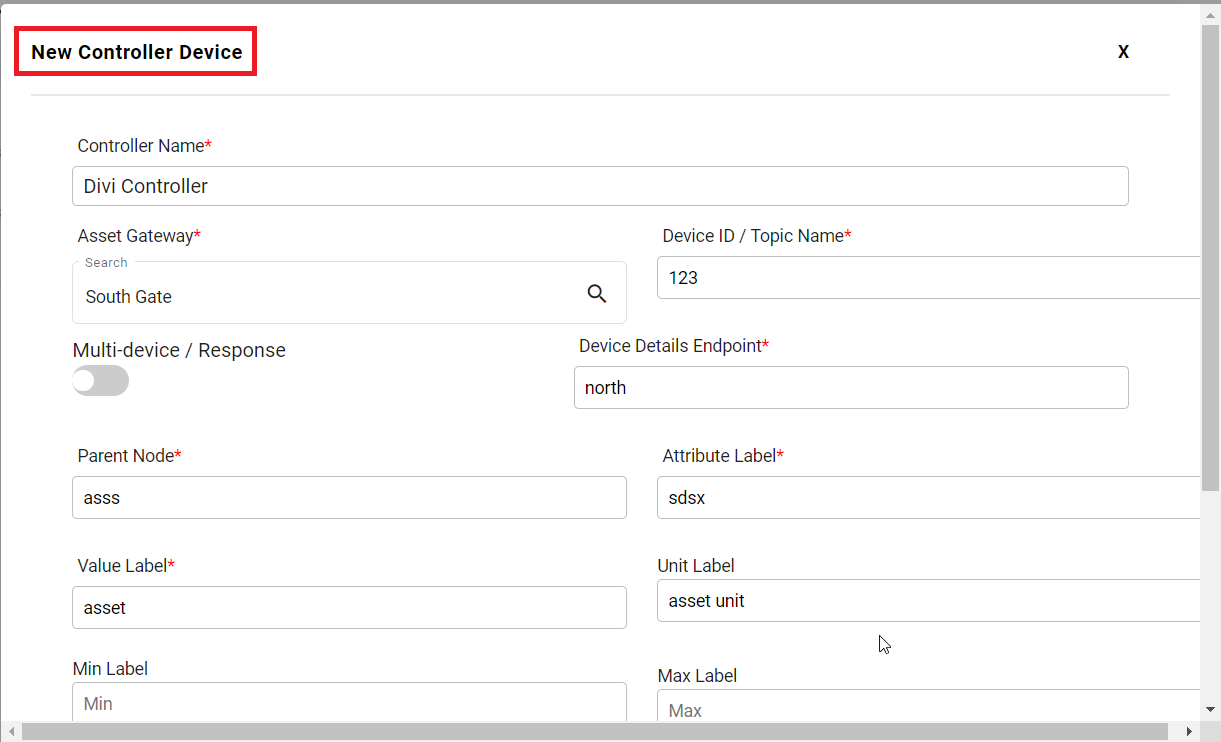
Fill the all-mandatory fields.

[![settings- Io T Gateway7.png](https://kb.asseto.ai/uploads/images/gallery/2024-09/embedded-image-ct0hh1xx.png)](http://ec2-3-7-68-25.ap-south-1.compute.amazonaws.com/uploads/images/gallery/2024-08/settings-io-t-gateway7.png)
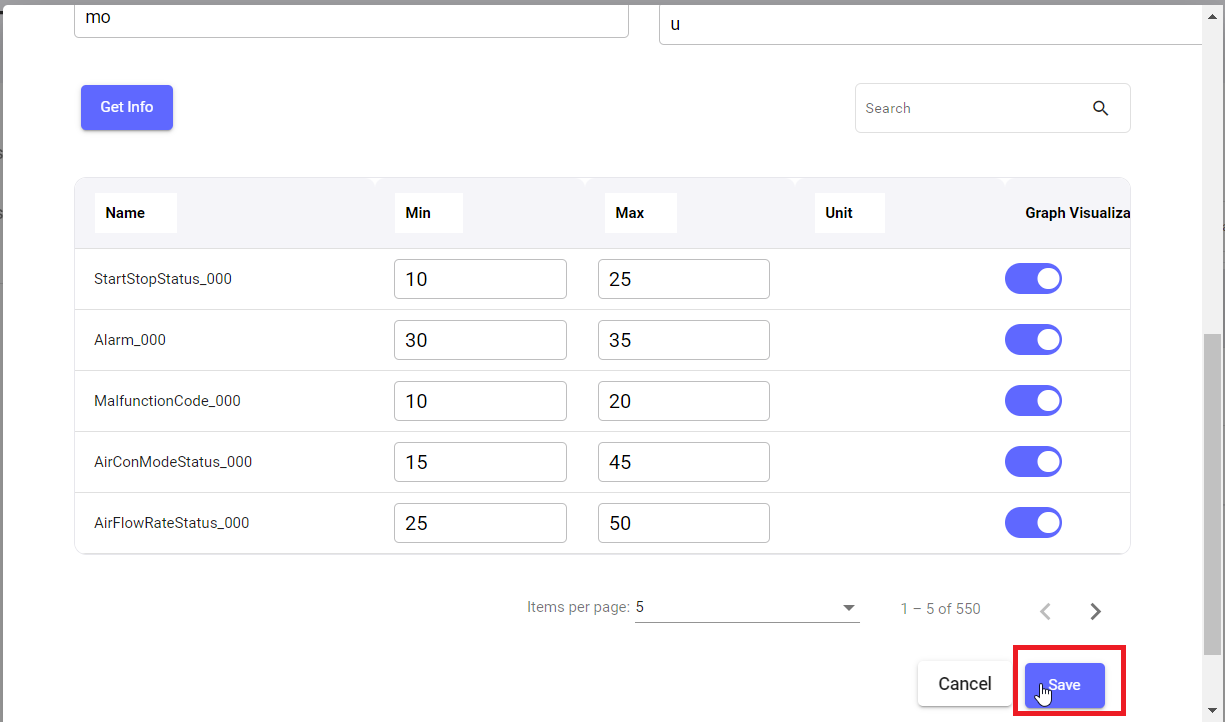
Click on “save” button, screen will be navigated to Asset Controller Device list page and confirmation message “Asset Controller Device added successfully” will be display and record will be display in first of the table.

[![settings- Io T Gateway8.png](https://kb.asseto.ai/uploads/images/gallery/2024-09/embedded-image-cuewewoy.png)](http://ec2-3-7-68-25.ap-south-1.compute.amazonaws.com/uploads/images/gallery/2024-08/settings-io-t-gateway8.png)
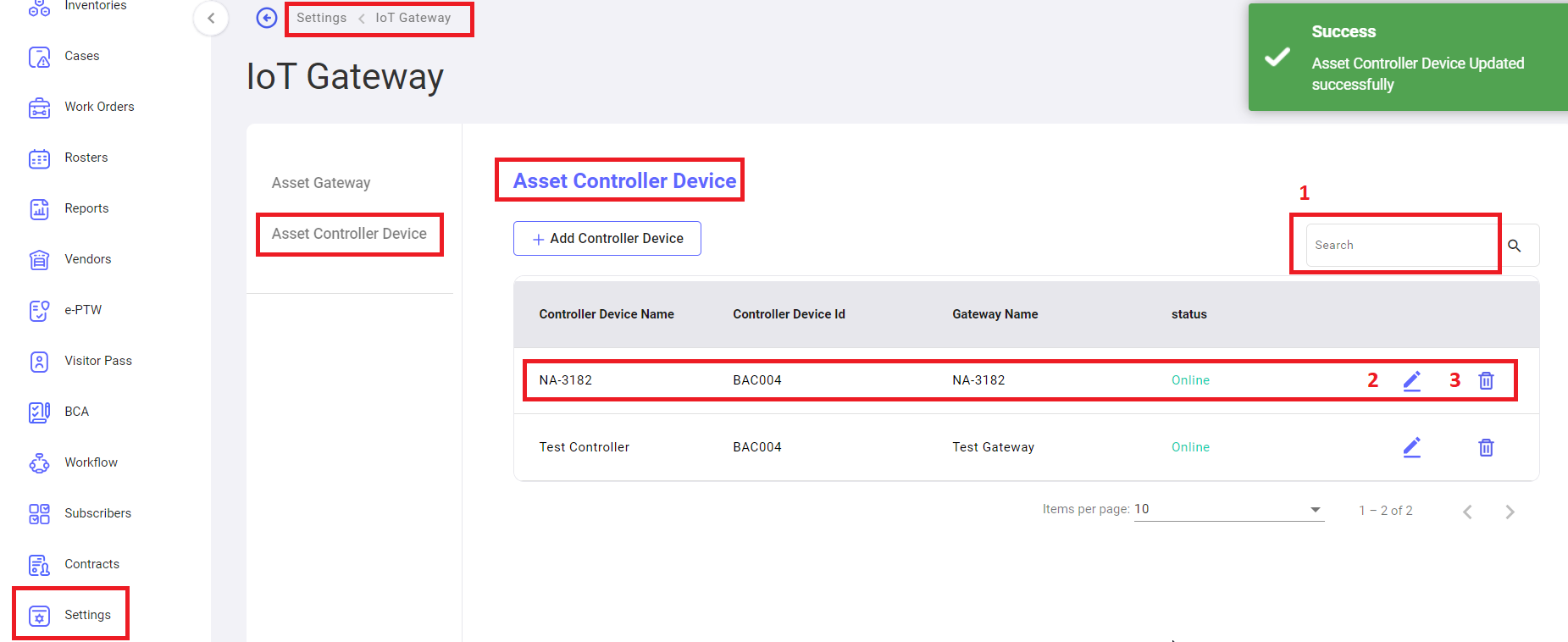
 <span style="mso-bidi-font-family: Calibri; mso-bidi-theme-font: minor-latin;"><span style="mso-list: Ignore;">1.<span style="font: 7.0pt 'Times New Roman';"> </span></span></span><u>Search</u>: to search the asset controller device with name.

<span style="mso-bidi-font-family: Calibri; mso-bidi-theme-font: minor-latin;"><span style="mso-list: Ignore;">2.<span style="font: 7.0pt 'Times New Roman';"> </span></span></span><u>Edit</u>: to edit/update the asset controller device details.

<span style="mso-bidi-font-family: Calibri; mso-bidi-theme-font: minor-latin;"><span style="mso-list: Ignore;">3.<span style="font: 7.0pt 'Times New Roman';"> </span></span></span><u>Delete</u>: to delete the asset controller device.

<div class="page-content" dir="auto" id="bkmrk--8">---

</div>